Windows Mobile Support

  • Subscribe to our RSS feed.
  • Twitter
  • StumbleUpon
  • Reddit
  • Facebook
  • Digg

Monday, 31 December 2012

My 2012 Enterprise mLearning Predictions Recap

Posted on 08:17 by Unknown


As 2012 draws to a close, its time to evaluate how in focus my lens on the future of enterprise mobile learning proved to be this past year and how many of my year ago predictions hit their targets. Back on December 30 2011, I scoped eight predictions ranging from hardware/software to content types and authoring tools to macro-level mobility trends our team felt would influence the market for mLearning products and services for the year and I wasn’t disappointed (or much surprised) about how it all played out. Here’s the analysis of how it all played out.

Prediction #1 - Mobile Learning Goes Mainstream. Or perhaps this is more a case of the classic “frog in boiling water” scenario. Whatever it is, this one is music to my ears after many years of toiling away to make mLearning a reality for the enterprise. The acceptance of mobile learning within the business community probably won’t happen with much fanfare, it will just happen and be accepted as a “norm” wherein the market no longer asks “should we offer learning to our employees (or partners or customers) via mobile device?” and will simply state “we need to offer learning to our workers via their omnipresent mobiles!” The reasons will be plentiful but largely driven by better/cheaper/more ubiquitous technologies and everyone’s acceptance of the fact we all use our phones (tablets, et al) to improve both personal and business communications and to be more productive.

On Target But... Overall interest in enterprise mobile learning definitely accelerated in 2012 with various surveys reporting that more than a simple majority of Learning and Development teams are committed to identifying ways to implement mobile learning for their workers and perhaps even customers as soon as practical in their organizations. We’ve certainly witnessed much of the inertia being driven at the grass roots level from executives, sales pros and other mobile-equipped employees sporting their own smartphones and tablets rather than in response to strategies being developed by the training department. For enterprise mobile learning to be considered a “bullseye” and truly mainstream, the level of adoption will needs to be measured in wide scale usage not just varying levels of investigation, pilots and strategy development.  All that said, our company witnessed large scale enterprise deployments in 2012 from several early adopter customers and partners who are now being rewarded for their progressive thinking and are now gaining “first mover advantage” over their peers and competitors. And wherein a typical mLearning deployment was measured in 100s of mobile workers back in 2008 through 2010 and in the 1000s of mobile workers as recently as this past year, the target and committed audience for several active programs is expanding to 25K, 50K and more mobile workers for several planned initiatives we are supporting moving into 2013 – that’s something I’ll categorize as mainstream for sure for a lucky few!  

Prediction #2 - Access Points Diversify.  There will be more types of devices and ways to connect with our mobile learning world in 2012. And I am not just talking about the classic iOS vs. Android vs. other argument but the fact that different classes of hardware will start to get into our learning mix too. By next December, the average corporate learner will likely have a capable smartphone and their desktop/laptop PLUS a media tablet and/or eBook reader and perhaps even a smart TV back at home that is web-connected and runs apps. The ability to move seamlessly from one device experience to another will be critical with complete synchronization of our learning progress, status, achievements, etc. no matter where or when we choose/need to learn.

A Hit & A Miss. The first part of this prediction was “spot on” – enterprise workers are better equipped on the mobile front at the end of 2012 than they’ve ever been. A simple majority of all workers are now sporting data-driven smartphones versus the simple feature phones that have dominated the landscape into 2012. And highly capable tablets and eBook readers now occupy prime real estate in many of our briefcases and messenger bags and likely sit atop everyone else’s tech toy wish list. This recent post suggests more tablets were received/activated on Christmas Day than smartphones fueled by our sustained interest in gadgets to help inform, entertain and hopefully educate us in times of need. I admit the level interest in smart TVs did not materialize in 2012 as I had expected it might for a variety of reasons and without capable intelligent displays in our living rooms learning won’t begin to happen there. I ponder how this would have played out if Apple had ventured into the television market as many analysts expected them to 2012 and that opportunity remains for 2013.

Prediction #3 - Mobile Web vs. Mobile App Debate Intensifies. Is enterprise mobile learning best delivered via native mobile apps or using mobile web apps? I agree the technologies to create, deploy and manage HTML5-based mobile web apps will greatly improve in 2012 but I don't feel they will mature to the point they can replace all native apps – at least in most of the primary enterprise use cases for learning that’s managed and tracked. The many advantages of mobile web apps – like cross platform OS support for iOS, Android and others – will still be mitigated in key areas like security, off-line storage, sync updates, access to device features like cameras (although this is improving in the spec) plus critical infosec concerns like SSO support when disconnected and remote wipe capabilities that just don’t work in mobile web apps yet. We do sense that mobile web apps will start to take their rightful place when looking to support an organization’s external learners (e.g., partners, customers) where ease of install/access are paramount and the required features can be limited to what’s essential instead of everything that’s required by IT, security and management.  We also think hybrid apps that mix the best of native apps and mobile web apps will have a bigger impact on enterprise mobile learning thoroughout 2012 than just pure mobile web apps for that same market.

Bullseye. The use of native apps continued to dominate the enterprise mobile learning landscape in our experience throughout 2012. Interest in the mobile web app approach remains strong with many organizations especially from those wading into the mobile learning pool for the first time (from both the customer and vendor perspective). True, mobile web app access methods are cheaper to design and deliver in multi-device mobile environments but the feature set still remains limited with respect to things like access to core device features (camera, accelerometer), device security, offline access and experience customization. I agree the HTML5 tools used for mobile development are improving with each and every quarter but it will take a year or more for these capabilities to begin to match the native experience. Finally, given we can deliver mobile learning to our customers using either approach – as we have native app frameworks for every major device and content can also be accessed via any web kit-enabled mobile browser – our actual access stats suggest the majority of mobile learners prefer the native app route and will take the time to download, install and configure an app to gain a better overall learning experience.  And learning vendors (e.g., Brainshark, Plateau/SF/SAP, Saba, Skillsoft) who suggest the mobile web app approach is superior to the native app approach have simply not made the necessary investments required in building the right teams and selecting the proper tools and methods that meet contemporary mobile learner and more general business app mobility expectations.

Prediction #4 - Flash Falters, HTML5 and ePUBs Gain in Popularity. 2012 will be a pivotal year in the way enterprises must think about designing, producing, delivering and managing their content strategies, and mobility strategies will alter many of our current tool kit and business process choices.  Adobe’s move to stop developing Flash Player plug-ins for mobile web browsers set a BIG BALL in motion that quelled the desire for many Instructional Designers to use pure Flash or popular rapid development tools outputting Flash-based content as their unified content delivery strategy.  Part of this shift was driven by the fact that Flash-based content actually didn’t perform/behave well on most Flash-enabled handsets and tablets especially when the content was local rather than on a server. Much has been said and written about the next wave of HTML5-based authoring tools or updates that will transform yesterday’s authoring tools into tomorrow’s more flexible and functional authoring systems and I suspect we’ll have nice working versions of the top five offerings able to create content that’s both desktop and mobile device friendly by mid year with commercial ready offerings from Adobe, Articulate and a host of others.

I also think many teams will begin to rethink their content creation and delivery options resulting in new ways to chuck up or package content that’s friendly to both online and mobile consumption scenarios. One trend is to move away from monolithic, structured 20 to 30 minute courses that worked fine online via a PC towards the notion of shorter, standalone learning objects that can be more easily discovered, accessed and consumed at the time of need from any device/app.  Another counter-balanced trend gaining momentum will be the use of eBook style delivery formats that make it easier to produce and manage long-form content that is far more feature rich than static PDF files. Growing interest in the ePUB content formats, especially media-friendly ePUB-3s, will allow learners to gain more from and interact better with the content packages themselves and enable cool functionality like highlighting, like better indexing/threading and both personal and shared note taking all with the same level of access control and tracking that’s generally only found today with an online eLearning course.     

Near Bullseye. 2012 will be remembered as the year the current shifted on Adobe Flash as the preferred training content and rich media delivery format. Steve Jobs’ 2010 insistence that his company’s devices would rely on more “open standards” based on HTML5 and CSS over the then ubiquitous Flash standard proved both powerful and prophetic resulting in a slow but steady transition away the well established but dated comfort zone our industry had grown accustomed to. Learning tool makers are finally starting to step in to fill the void created by this seismic shift and 2012 witnessed acceptable (albeit inaugural) levels of mobile-centric capabilities coming from several leading and formally Flash-centric stalwarts like Adobe, Articulate, Harbinger, iSpring and others. Early mobile-focused tool innovators like dominKnow and Rapid Intake (now part of Callidus) also benefited from their HTML5 first mover advantages and real world experience making their respective core offerings more flexible and powerful in the mobile realm. Every vendor currently stuck with Flash-only content delivery methods is extolling the virtue of their “soon to be released” HTML5 (or other mobile friendly) offerings to stay relevant in the face of all these new choices. And many of these product refreshes are working to include other mobile-optimized extensions like the Tin Can/Experience API that will make mobile tracking easier to manage and manage. Finally, I really like what’s happened on the ePUB front though there’s still a lack of nice tools for creating cross-platform/device compatible eBook-style deliverables. I’d love to see some nice innovation in this area in 2013 knowing this new world content/media packaging movement represents a truly fresh and interactive way to rethink a plethora of mobile content use cases.

Prediction #5 - Gamification Accelerates mLearning Adoption.  Once everyone has the right devices and organizations accept the mandate to provide training, performance support and business communications via mobile, what will compel learners to participate and keep them engaged when there are so many distractions like Facebook, Twitter, Farmville and mobile shopping? Gamification seems to be a likely answer to that question. Not that companies need to even create “games” per se; rather, the trend will be towards gamifying our standard formal learning actions and informal social interactions through the addition of point systems, achievement leveling/scaling, overall leader boards, badging systems and tangible reward/incentives. Increased awareness of who’s ahead and how can others beat them to the finish line will drive learner engagement and overall organizational behavior and mobile access to these learning materials and communities makes it easier to participate and stay connected whenever the mood suits us.

On Target But...The word “gamification” definitely entered the lexicon of many training teams in 2012 although what is means/represents is still in question and misunderstood by many and debate of its merits will continue well into 2013. For the uninitiated, gamification as it relates to learning is the practice of applying game mechanics and dynamics – commonly things like points, badges and leader boards (and so much more) – to non-gaming activities or learning interactions to drive engagement and accelerate business outcomes. As a vendor who offers a fully integrated “gamification engine” that ties directly to an online and mobile LMS platform, I can comfortably say two things: (1) gamification is NEVER going to marginalize nor replace the efforts of real game designers and the highly polished, immersive and effective environments they deliver (nor was it ever meant to), and (2) gamification IS making a real difference in driving learning engagement, improving product/service knowledge levels and increasing organization performance when applied to the proper learning interactions and situations. We’ve seen training completion and knowledge retention rates in game-enabled learning environments increase anywhere from 200% to more than 900% meaning more people are actively engaged and better prepared to perform their jobs. True, not all organizations are ready to take a leap at adding gamified learning practices into their mix but they certainly should be open to checking out what’s possible/practical without dismissing it outright for reasons various pundits assume but generally can’t confirm.

Prediction #6 - Fewer but More Capable Tablets. I suspect the annual Consumer Electronics Show (“CES”) event in Las Vegas next week will have far fewer tech OEMs wading into the tablet pool as compared with January 2011. Apple’s iPad will continue to be the market leader in 2012 though a collection of tablet devices based on Android (in older Honeycomb to newer Ice Cream Sandwich flavors), Microsoft Windows 8 and possibly even RIM’s PlayBook 2.0 OS will continue to eat away at Apple’s market share as organizations seek to take advantage of the tablets for media consumption, user-generated content creation and in situ selling supported. Interest in using tablets for business purposes comes across business sectors large and small alike too and we see the broader trend of tablets replacing laptops in many instances and even becoming shared devices in certain use cases (e.g., retail sales, in field tech trucks, departmental loaners) but requiring enterprise level controls and security too. 

Near Bullseye. There’s a large and growing chorus that tablets are the first and only viable way to deliver highly functional mobile experiences – from sales tools to performance support to line of business applications to learning – to our on-the-go enterprise workers. Having spent eight plus years developing mobile learning solutions for the enterprise, I would tend to disagree with that statement but will concede that tablets have captured our attentions and are driving new and renewed interest in enterprise mobility solutions spanning a wide array of business use cases. Part of this trend is less about the tablet being a better form factor than a smartphone but more about the tablet being a more practical and cost effective alternative to a standard issue laptop. Companies across industries and geographies alike are replacing last generation PCs with next generation tablets for myriad reasons including being instant on, always connected and often just more fun to use and interact with. As predicted, the number and variety of tablets introduced throughout 2012 was smaller than seen in 2011 and serious market leadership was relegated to a select number of tier one vendors including Apple, Samsung, Google/Motorola and Amazon fighting to stay a few steps ahead of tier two competitors like RIM, Microsoft, Lenovo, Barnes & Noble. Despite the fragmentation at all levels, the lion’s share of tablet adoption for mobile learning within the enterprise was concentrated on Apple’s various iPad offerings especially when firms were looking to equip their sales teams and executives.  I think Apple will continue to be the majority player for the next year although their overall market share will continue to erode to the benefit of various Android-based alternatives. Microsoft had a tough go of trying to convince the market that their Windows 8 and RT/Surface-based tablets were the right enterprise alternative to the iPad as evidenced here.  And being the low cost provider in this sector hasn’t proved to make much of a difference in what an enterprise will purchase for their mobile workers.

Prediction #7 - Cool Mobile Tech Sparks Learning Innovations. The latest mobile devices support a wide array of new features that will ignite some nifty innovations in the learning space throughout 2012. As people and companies replace their older BlackBerries, iPhones and Android devices, their new equipment will sport cool next-gen functions like dual core processors making big media and big data easier to manage on our smaller devices. We will benefit from faster data speeds using LTE (“long term evolution”) or true 4G radios enabling quicker access to high value content as well as video access to our experts and web conferencing access to scheduled ILT events. And more advanced operating systems combined with embedded chips will provide support for new forms of proximity computing using Near Field Communication (“NFC”) thus allowing new kinds of location-based services for learning. I feel the positive effects of the aforementioned evolutions will be more pronounced than similar advances in areas like augmented reality that will remain costly to design, produce and manage.  

Target Missed. It’s true that better and faster devices were everywhere this year but I think most of these delivered innovation promises failed to have much effect on driving the learning side of the market. And while I am pleased to have LTE-enhanced handsets and tablets at my beck and call, the learning experience hasn’t really improved appreciably because I had a faster connection. The promise of NFC, location-based services and augmented reality-based use cases were not attained either nor did they seem to be compelling enough for our customers to demand these sorts of services – at least not yet.


Prediction #8 - Market Consolidations Continue/Accelerate.  The big will continue to eat the small as larger vendors seek to increase their market appeal to both customers and investors. According to Bersin and Associates, 2011 already saw several of the tier one Talent Management vendors actively engaged in expanding their market reach and the portfolio offerings through strategic acquisitions and mergers and these moves make the resulting companies far more attractive acquisitions to the larger enterprise software whales that rule their respective oceans. SAP’s planned takeover of SuccessFactors and Oracle’s move on RightNow (approved this week) all are harbingers of more market consolidation as larger companies look to flesh out their cloud, mobile and social strategies. 

On Target.  The big continued to eat the small throughout 2012 in an effort to protect market share while bolstering their portfolios with innovative product and service offerings at all ends of the business spectrum. Tier Ones like Oracle captured Tier Twos like Taleo to strengthen cloud and talent appeals alike. IBM consumed Kenexa right after they had acquired LCMS vendor Outstart who had previously bought Hot Lava for their mobile learning offering – a food chain process that will be repeated time and again. Several of the LMS/TM players like Saba, Cornerstone on Demand and Callidus Cloud each gobbled up smaller and flexible innovators across a variety of disciplines to beef up their product suites and help tell a better story to both customers and investors. I suspect even more of the same in 2013 especially with the looming uncertainty the financial and general business markets and the effects these constraints will have on R&D budgets and resulting lack of innovation coming from hobbled teams.


So, that’s a wrap for 2012. Stand by for my 2013 predictions in the next few days as we look into what the future hold for enterprise mobile learning.  And thanks for reading this and sharing it with others too! 

Robert ;)
Read More
Posted in | No comments

Monday, 17 December 2012

Today Software Magazine, 7th number - Writing about Windows Azure Mobile Services

Posted on 23:29 by Unknown
Yesterday, December 17th, the 7th number of Today Software Magazine was lunched. In this number I wrote an article about how a backend of a mobile application should look like. To be able to create a backend for a mobile application I presented Windows Azure Mobile Services.
Windows Azure Mobile Services come with a mechanism build in to store data, authenticate users, push data to devices and define custom scripts on the server side. There are two things that are very interesting:
  • Build in support for iOS and Android, not only for application developed for Windows Store and Windows Phone
  • JavaScript used for define server side script
You can find the article here.

Read More
Posted in Azure, mobile services, Windows Azure | No comments

Friday, 14 December 2012

Mobile Services from Windows Azure - Data Store and custom script(part 3)

Posted on 00:54 by Unknown
Part 2
In last post we saw how we can create a table using Mobile Services to store GPS position. We discover how we can setup who can make each CRUD operation on our table.
In this post we will continue to see how we can write data and retrieves data from our table. We already created an instance of MobileServiceClient. From this service we will need to retrieve an instance to our table using GetTable method. After we have a reference to our table (IMobileServiceTable) we will be able to execute any kind of request over our table:
IMobileServiceTable tableService = mobileServiceClient.GetTable<Location>();
await tableService.InsertAsync(location);
await tableService.Select(l=> { … });
await tableService.UpdateAsync(location);
I think that you already notified that all the methods are async. Also, you don’t need to manual create a new instance of the IMobileServiceTable. This is handled by the Mobile Services component automatically.
Do you remember how we setup our table? Only authenticate users will be able to execute any kind of action. Because of this we will need to add the authentication mechanism also.
Don’t be afraid, the authentication step is very simple. This mechanism is already implemented by Mobile Services; we only need to call a method that will make the entire job for us. In this moment we have 4 identifier providers that are supported (Google, Facebook, Twitter, Windows Live). You cannot add custom providers in this moment.
await mobileServiceClient.LoginAsync(MobileServiceAuthenticationProvider.Facebook);
Calling this method will display to the user the authentication dialog. We don’t need to do anything more than this. When the authentication failed an “InvalidOperationException” will be throw. We can catch this exception and do any kind of action we want.
After this step we will be able to access user information using CurrentUser property of MobileServiceClient. Each request that is made to our table will contain a parameter named ‘user’ with user information. 
We don’t want to permit users to see location of other users. To be able to restrict access of users we will need to define a script. On each CRUD operation over tables from Windows Azure Mobile Services we can define a custom script that will be called before each request will be executed. In this script we can define almost any kind of action we want.
An interesting part of these scripts is the programing language that needs to be used – JavaScript. This is a great think from the development perspective, because you don’t need to know C# or F# to be able to work with these scripts. The script can be added from the management portal and even ad we will have support for intellisense. A lot of libraries from NodeJS are supported. You will not be able to add reference to your own libraries, but you can define your own method. I great think that can be done is the support of calling remote services.
At this step we need to define a custom script for the insert operation. We will add another column to our table that will contains the id of the user. This action will be done from the script because we don’t want client to be able to hack their id.
function insert(item, user, request) {
item.userId = user.userId;
request.execute();
}
As you can see this step is extremely simple.The second parameter is send each time, even if the user is not login and contain the user information. The table will contain a column named userId with the id of the user.
When someone will do a query we want to retrieve items of the user that make the request. To be able to do this, on the read operation of a table we will add to the query a condition that will retrieve items of the current user.
function read(query, user, request) {
query.where({ userId: user.userId });
request.execute();
}
In this moment we saw how we can execute request over tables from Windows Azure Mobile Services, how we can define custom action over them.
Read More
Posted in Azure, mobile services, windows 8, Windows Azure, Windows Phone | No comments

Thursday, 13 December 2012

Code, code and code

Posted on 01:44 by Unknown
In this post I will talk about 5 bad things that I saw in different projects. A part of them is common sense, but people forget about this.
Base class name convention
XXXBase class is defined and used as a base class. Until this point this is perfect, but what do you think about this:
public class XXXBase { … }
Why you defined a base class that you want to be used as a base class for other class without the abstract keyword. If you want a base class doesn’t forget to add the ‘abstract’ keyword. You can use the naming conventions but this will not stop people to create instances of your base clas..
Method named like the class
If you have a class named XXX, don’t define a method in your class named StartXXX, ConvertXXX. When a user uses an instance of XXX he will already know that he do the actions over XXX.
Examples:
Converter.StartConvert() – Converter.Start()
Service.StartService() – Service.Start()
Engine.StartEngine – Engine.Start() 
TODO comments and production
What do you think about this?
//TODO: Remove this hack in production
//TODO: Add logs in production
People tend to forget to check the TODOs before making a release. If you need a release of this kind, maybe you should create a task also. I saw application after one year in production with these kinds of comments. Before making a release, closing a sprint look over the TODOs.
URLs and string
When you are defining a component doesn’t use string to send urls. .NET has the Uri class for this. You will need to define a validation mechanism to check if the string represent a URL and is well defined. For a client is more clear when you have a parameter of type Uri and not a parameter of type string named serverAddress or serverUrl or serverUri …
Bizarre comment
if (xxx != null)
{
// so bizarre...but if you don't, you'll ruin comms between the service and client
…
// so bizarre...but if you don't, you'll ruin comms between the service and client
…
}
Why do you add this kind of comment? Do you think that people will understand the problem? In cases like this, you should describe the problem not add a comment that will make people never to change of fix the problem. Writing code is not VOOODOO Magic.
Have fun!
Read More
Posted in | No comments

Monday, 10 December 2012

Mobile Services from Windows Azure - Data Store (part 2)

Posted on 02:58 by Unknown
Part 1
When we need a backed to store data for a mobile application Windows Azure Mobile Services can be a great solution.
Let’s imagine that we need to develop a mobile application that need to store the GPS location of our client. For this purpose we can develop a complicated solution, with a backed that exposes this functionality as services. Also we will need an authentication mechanism that will add another layer of complexity.
All this functionalities are already supported by Windows Azure Mobile Services. In this blog post we will see how we can configure.
First step is to configure our Windows Azure account to have Mobile Services active. In this moment Mobile Services is in the preview, because of this before creating a Mobile Services you will need to sign up to this preview. From the new command of the portal you will find a link to the sign up page for the preview. The activation time period is very short. Each Mobile Services has a unique name, which will identify our service. At this step you will notify that a database needs to be attached to this service. You can use an existing one, or you can create a new one. This database will be used to store data.
After creating our own Mobile Service we will need to create a new table in the data section. Only the name of the table needs to be set. The columns will be automatically updated when you will insert entities in it.
Each new table that is created has some special permission that can be set. Each CRUD operation (Insert, Update, Delete, Read) can have a custom permissions set. We have 4 permissions available:
  • Anybody with the application key – anybody that has our application key can execute the command over the table
  • Everyone – anybody with our Mobile Services credetinals can execute the command over the table (even if the request don’t come from our application)
  • Only authenticate users – only users that were already authenticated in the application can execute the command over our table
  • Only scripts and admin – only scripts and administrators can execute the command over our table
In our case we will add a table named GPSLocation where the permissions will be set to “Only authenticate users”.
Next step is to create the entity that needs to be stored. In this moment Mobile Services can be used from iOS, Windows Phone and Windows Store (Windows 8) applications. We will use Windows Store in this example.
[DataContract]
public class Location
{
int Id { get; set;}

[DataMember]
string Lat { get; set;}

[DataMember]
string Long { get; set;}
}
You notified that I decorated the class with DataContract. All entities that are saved need to be decorated with this attribute. This attributed is used when the entity is send to the Mobile Services and need to be serialized. Each property of our entity need to be a value type.
The Id property needs to be added to all items that are saved using Mobile Services. Each entity will be unique identified by this id. The auto-incrementation of this field will be made automatically by the system. Also we don’t need to add the “DataMember” attribute on this property. If we would need to references another entity that we will need to store the Id of the entity.
Mobile Services offer the build-in the mechanism that is used to consume data. The only thing that we need to have is the application url and application key. The application key is very important, because based on this people will be able to access your application.
You can use the same application key for an iOS and Windows Store application without any kind of problem. If your application key is compromised, a new one can be regenerated from the portal. In that moment you will have to make an update to your application with our new application key.
MobileServiceClient mobileService = new MobileServiceClient( [url], [applicationKey] );
This instance will be used to communicate with Mobile Services. All the request are made using HTTP/S and JSON. Yep, data are serialized in JSON format not in XML.
In the next post we will see how we can authenticate users to be able to add their GPS location. Remember, we set the rights to “Only authenticate users”. Because of this we need to be authenticating to make any kind of operations on our table. We need this because we don’t want to share locations between users.
Part 3
Read More
Posted in mobile services, windows 8, Windows Azure, Windows Phone | No comments

Windows Azure Table - How to chunk commands in batches of 100 items

Posted on 01:23 by Unknown
Based on what kind of data store we are using, there are cases when the size of a batch is limited. For example if we want to execute an update batch command over Windows Azure Tables we will notify that the maxim size of a batch is 100. Also all the updated command needs to be on the same partition key.
What should we do if we have a batch that with more than 100 items. The simples’ solution is to create groups of chunks of 100 items and execute and execute them in parallel. In the next part of the post we will see how we can create chunks of items from a list:
List<Foo> items = new List<Foo>();
….
int chunkSize = 100;
List<List<Foo>> chunks = new List<List<Foo>>();
int index = 0;
int itemsCount = items.Count;
while( index < itemsCount )
{
int count = itemsCount > chunkSize
? itemsCount
: index;
Chunks.Add( items.GetRange( index, count));
}
After this step if we need to execute the update command over the table context we can do this very easily:
foreach( var chunk in chunks )
{
// execute the update command using the Save command.
}
In this post we saw how we can create chunks of items to be able to execute different command on them. If we don’t do this step we will get error when we will try, for example, to update 101 items using only a batch command.
Read More
Posted in Azure, Windows Azure | No comments

Friday, 7 December 2012

How we can remove millions of entities from a Windows Azure Table (part 2)

Posted on 06:11 by Unknown
In one of my latest post I tacked about how we can remove a lot of entities from Windows Azure – deleting the table.
This solution works but we will have to face up with an odd problem. When we are deleting a table, we only mark it for deletion, our client will not be able to access the table and in background Windows Azure will start deleting the table. If we have a table with millions of entities will face up with a big problem. Until Windows Azure will finish deletion of the table will not be able to create a new table with the same time.
This can be a blocker. We don’t want to wait 4 hours, until our table is deleted to be able to recreate another one.
And here is a big BUT. We can be smart and use ListTables. Basically we can create another table that have the name something like [MyTableName]+[Guid] and using ListTable method to retrieve the name of our table only using [MyTableName].
Using this solution, we can add mark our old table for delegation and create a new table with a similar name where we can store our entities. In this way we will be able to remove items from a table in only a few seconds.  Even if this “virtual” clean it works great and can speed up our applications.
The following code can be used to delete a table:
CloudTableClient tableStorage = new CloudTableClient([tableUri],[credential]);
string tableName = [MyTableName];
tableName = tableStorage.ListTables(tableName).FirstOrDefault();
if (tableName != null)
{
tableStorage.DeleteTableIfExist(tableName);
}
The following code can be used to retrieve the name of our table and recreate a new table of don’t exist:
string tableName = tableStorage.ListTables([MyTableName]).FirstOrDefault();
if (tableName == null)
{
tableName = [MyTableName] + Guid.NewGuid();
tableStorage.CreateTableIfNotExist(tableName);
}

The only downside of this solution is that there are some seconds when we will not have a table where clients can access it. If we can leave with this solution and we can manage this problem on the client side than we can use it without any kind of problem.
Read More
Posted in Azure, Windows Azure | No comments

Wednesday, 5 December 2012

How we can remove millions of entities from a Windows Azure Table (part 1)

Posted on 01:07 by Unknown
Part 2
Windows Azure Table is a great please to persist different information. We can store in the same table thousands of thousands of thousands of thousands of items. This sounds so good, but we can have small problems. The first problem that we can face up is how we can delete all the content of a table very fast.
The maximum number of items that we can update/delete in a batch is 100 entities. Because of this deleting 1 million of entities will take a long of time. We could try to parallelize this action, but this is a little complicated and maybe we don’t want to do this.
Another solution that we could use is to delete this table and recreate it. If you need to drop all the content from a table this is faster than delete entity by entity. Think in this way. When you need to remove the content of the text file, it is faster to delete row by row or to delete the file and recreate it.
CloudTableClient tableStorage = new CloudTableClient(
[absoluteUri],
[credentials]);
tableStorage.DeleteTableIfExist(tableName);
bool wasRecreated = false;
while (!wasRecreated)
{
try
{
tableStorage.CreateTableIfNotExist(tableName);
wasRecreated = true;
}
catch (StorageClientException storageClientException)
{
if (!(storageClientException.ErrorCode == StorageErrorCode.ResourceAlreadyExists
&& storageClientException.StatusCode == HttpStatusCode.Conflict))
{
throw;
}
Thread.Sleep(1000);
}
}
When we call the delete method, even is a sync or an async method the table will be mark for deletion. The real delete action will be in background and you don’t have any kind of possibility to be notified. When you try to recreate the table and the delete action is still in progress, a StorageClientException will be throwing when the error code will be set to “ResourceAlreadyExist” and the status code will be set to “Conflict”.
Usually this kind of action will take for around 40s. depends on the load of the servers. The problem with this solution is with the time interval while the table is deleted. In this period of time clients will not be able to access this table and they need to handle this expectation.  This can be accepted in some situations.
We saw a solution to delete the content of a table that have millions of entities. What do you think? Do you see a better solution?
Part 2
Read More
Posted in Azure, Windows Azure | No comments

Monday, 3 December 2012

Windows Azure Service Bus Topic - Detect messages that don't have subscribers

Posted on 01:49 by Unknown
Windows Azure Service Bus Topic is a great service that provide as the ability to distribute a message to more than one subscriber. When we publish a message to Service Bus Topic we don’t need to know how many subscribers are. Each subscriber can register to a topic and receive the messages (each subscriber can define custom rules – to filter what kind of message he wants to receive).
But how can we check if a message will be received by at least one subscriber. When we publish a message we don’t know who will receive the message, because of this we need a way to know what messages were not received by anyone. In this current implementation of Service Bus Topic, when a message is send to the Service Bus Topic and the current messages is not accepted by any subscriber, the message is not persisted in the Topic. Because of this the message will be lost and we will not be notifies about this action.
Service Bus Topic give us the ability to be notifies when we send a message to the Service Bus Topic and will not be received by any subscriber. When we create the topic, we need to set the “EnableFilteringMessagesBeforePublishing” to TRUE. In this moment when we will send a message to the topic, Windows Azure will check if there are subscribers for these messages. When there are subscribers everything will go as normal, but when there will be 0 subscribers for our message, a NoMatchingSubscriptionException will be throw. This exception will notify us that there are not subscribers for our client and we will be able to take any kind of action.
To create a topic with this setup we need to do the following:
NamespaceManager namespaceManager = NamespaceManager.CreateFromConnectionString([connectionString]);
namespaceManager.CreateTopic(
new TopicDescription([topicName])
{
EnableFilteringMessagesBeforePublishing = true
});
When we send the message we will need to cache “NoMatchingSubscriptionException” exception and do our custom action.
We saw the mechanism that Windows Azure offer to us the detect messages that don’t have at least one subscriber. If we don’t need to know and detect them we can set this flag to FALSE. This is a great mechanism that is very easy to use.
Read More
Posted in Azure, service bus, Windows Azure | No comments

Wednesday, 28 November 2012

Mobile Service on Windows Azure (part 3)

Posted on 12:26 by Unknown
Presentation 2 
Yesterday I had the last session about Mobile Services on Windows Azure for MSP of UTCN from Cluj-Napoca. We talk about authentication and push notification on mobile devices as Windows 8, Windows Phone 8.
Mobile Services from Windows Azure can save as not only from a lot of work but also can reduce our application complexity. Don’t forget that authentication using Mobile Services will not provide you access to SkyDrive or other services that are coming with a Windows Live account.

Here is my presentation:
Read More
Posted in | No comments

Monday, 26 November 2012

Windows 8 Dev Camp Sibiu, 24.11.2012 - Postevent

Posted on 10:08 by Unknown
This Saturday we had our first CodeCamp event in Sibiu. Even if it was the first event in Sibiu we had a lot of attenders – we were almost 100 people that stayed with us almost 7 hours.
This event was dedicated to Windows 8 and was named “Windows 8 Dev Camp”. We tacked a lot about Windows 8 from different perspective and how can be integrated with different services like Mobile Services or Media Services from Windows Azure.
Because this event was an event dedicated to developers and technical persons we tried to explain all the base thing that a develop need to know about Windows 8. One of our speakers (Mihai Tataran), brought in exclusivity a Windows Surface. This is a great device with a high potential. All the people that stayed until the end had the chance to win some software licenses.
At this event I talked about the architecture of Windows 8, WinRT, native languages that are available on this new platform and what thing that a developer need to know. You can find my presentation below:
Radu vunvulea building and testing windows 8 metro style applications using c++,c# and java script from Radu Vunvulea
We really enjoy coming in Sibiu and we hope to see you soon.
Read More
Posted in codecamp, eveniment, windows 8 | No comments

Thursday, 22 November 2012

Mobile Services from Windows Azure - Introduction

Posted on 10:12 by Unknown
What do you think about Windows 8 and Windows Store? It has a great potential and is a place where people with good ideas can develop application.
Usually when you develop an application you also need a backend. A place where authenticate users, to store data and so on. Windows Azure comes with a solution that can freaks out any kind of backend developer – Mobile Services
Why is so great? A lot of backend stuff that you need in a normal mobile application is built in. Let me give you some example:
  • Authentication infrastructure for Windows Live, FB, Twitter, Google and more coming soon
  • Push notification
  • Store data on the server
  • Custom scripts on working with server data
And this is not all. Imagine that you develop an application for iOS. Could you integrate Mobile Services from Windows Azure? YES, you can. In this moment, after you setup your mobile service you can download a sample application for Windows 8 App, Windows Phone or iOS that contains all the settings for your account and a demo application.
In this way starting using Mobile Services and integrate it in your application is an extremely simple job.  In this moment Mobile Service in the preview state. During this period you can use up to 10 mobile services and have maximum 165MB out band traffic per day for free. More about pricing of Mobile Services can be found in the following link: https://www.windowsazure.com/en-us/pricing/details/
What I really liked at this service is how rapidly you can integrate it in your application. In less than 5 minutes you can create a service and connect your mobile application to it.
Let’s see what you need to do for creating a mobile service. If you don’t have a Windows Azure account yet, you should create a new account. After this go to New->Mobile Service->Create. Because this service in in the Preview, you will have to go to https://account.windowsazure.com/PreviewFeatures?wa=wsignin1.0 and hit the “Try it now” on Mobile Services section.
You will need to give a unique name to your service. Also, a SQL Azure Database needs to be created. If you already have a database created, you can it without any kind of problems. If you have a trial account on Windows Azure it is okay. The trial account also contains a 1GB SQL database.
The last think that I want to tell you is related to how your services are exposed. Of course you have component for WP8, Windows 8 App and iOS that can make all the calls for you, but you should know a little about how the magic happens. Like the rest of services exposed by Windows Azure, REST API is the secret. All the services are exposed using REST API. In this way services are not limited to specific consumers. You can develop application in any languages – and trust me, the REST API is very well documented.
In this blog post we saw what are Mobile Services, what we can do with them. In the next post we will take each feature and present it from a developer perspective (what we need to take an account and how to integrate it).
Part 2
Read More
Posted in mobile services, windows 8, Windows Azure, Windows Phone | No comments

NetCamp 2012 - Windows 8 development experience

Posted on 09:21 by Unknown
During this week I participate to NetCamp 2012.  This was the 6th NetCamp event and is organizing by Evensys. NetCamp is a dedicated event for online entrepreneur and how they can turn their ideas in reality.
What I’m doing there? Well, I had a session where I presented how was the development process of Trip Journal on Windows 8 and what are the things that an entrepreneur should take into account when select the platform for their application.
Any entrepreneur that would like to develop mobile application in Windows 8 should take into account the following thinks (these are the most important ideas from my presentation):
  1. Windows Store – a big opportunity for any person with ideas. It is place where your application can be visible to users
  2. Windows 8 Apps – one application for desktop and tablet version. You don’t need to write different applications for different devices
  3. 3 native languages that can be used to develop a Windows 8 App – C#, C++, JavaScript
  4. Windows Store App is not an Android or iOS application
  5. Before starting imagine the UX of your application take a look what does a Windows 8 App UX means (especially UI elements and gestures)    
  6. Implement the Snap Screen, users will love it
  7. Don’t forget to create a privacy policy statement – double check the content of it with someone from legal department
  8. Look a little over the application lifetime. The most important thing to remember is only foreground application can run code (if you need something in the background use background tasks)
  9. Before publish the application to the store don’t forget to validate it using Windows App Cert Kit
  10. On Windows Store, monetize an application is very simple and mechanism like trial version are built in
Here is my presentation:
I hope to meet you again next year.
Note: Trip Journal is a great travel application developed by iQuest. You can find Trip Journal on different platforms from iPhone to Android, from Symbian to Windows 8.
Read More
Posted in windows 8 | No comments

Mobile Service on Windows Azure (part 2)

Posted on 00:10 by Unknown
This week I continue the presentations for MSP team from Cluj-Napoca. We talked about how you can store data of your mobile device (Windows Store App – Windows 8, Windows Phone and iOs) using Mobile Services of Windows Azure.
Mobile services on windows azure (part2) from Radu Vunvulea
Next week will talk about authentication.
Read More
Posted in Azure, Cloud, eveniment, Metro App, mobile in the cloud, Windows Azure | No comments

Tuesday, 20 November 2012

CDN is not the only solution to improve the page speed - Reverse Caching Proxy

Posted on 07:34 by Unknown
I heard more and more often think like this: “If your website is to slow, you should use a CDN.” Great, CDN is THE solution for any kind of problems… or not. Depends what is our problem.
First of all let’s see what does CDN means. Content Delivery Network gives us the possibility to improve our web application performance by distributing our content in different geographical location that is closed to our client. This is a great solution when we have static content like images, videos or any kind of static content.
In this moment there are a lot of great solutions, from Azure CDN that are very easy to config and scalable to EdgeCast or Akamai.
But maybe our problem is not from there. What happens if users are in the same geographical region? Using a CDN may or not may improve our speed performance. The entire request will hit our servers. A bunny will tell us: “It’s not a problem dude, we live in the cloud nowadays, scale up your application on more instances”.
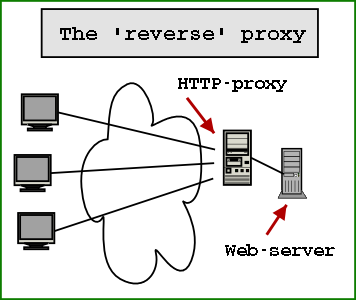
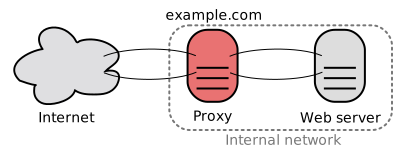
HTTP Caching Reverse Proxy is used for caching HTTP content. It is a proxy that stays between your servers and end uses. All the inbound traffic will hit your proxy and after that your web servers. This proxy will try to cache all the content (dynamical one) and will response to the client with the cached information (when is possible). What kind of content is cached can be directly controlled from images, to CSS or dynamic content.
The reverse cache proxy is faster than our web servers, because all the assets can be served more rapidly. The content of the reverse cache proxy is not complicated and is not so mixed like our web servers. Because reserve cache proxies take a part of the calls that should hit our web servers, the web servers will respond faster. Web server will be able to server request that are more specific and will not spend precious resources delivering content.
Let’s see why a reverse cache proxy is good:
  • Any kind of content can be cached, from static one to dynamically one
  • We can control the cache flush
  • Our web servers will not be so loaded, reverse cache proxy will unload our servers
  • The application don’t need to know about this caching mechanism and switching between with or without reverse caching mechanism can be without caching application
Let’s see what the properties of CDNs are
  • Can be used out-of-the-box, it is implemented by another provider and we only need to use it
  • Not connected with our application
  • It is great for static content, that don’t change very often
  • URLs need to be change a little to be able to use CDN
  • A lot of servers located in different locations
  • It is not connected with our application
  • Recent CDNs can cache dynamic content also
And not the big question… When we should use CDN and when we should use reverse cache proxy?
Caching static content based on geographically location of the users (we eliminate the delay caused generated by user-location) is suitable for CDNs
If we want to reduce the trips to our web-serves, calls to our database and cache frequently content (dynamic, not only static) that reverse cache proxy can be our solution
In conclusion we saw when a CDN or a reverse cache proxy is good. We could say that CDN don’t eliminate the need of a reverse cache proxy. And a reverser cache proxy doesn’t eliminate the need of CDN. We can use both type of caching.
Read More
Posted in Azure, cache, Windows Azure | No comments

Monday, 19 November 2012

Windows Azure Tables - One of the request inputs is not valid.

Posted on 05:00 by Unknown
In this blog post we will talk about an error that occurs when we want to delete or update entities from Windows Azure Tables. Let’s assume that we have the following code:
TableServiceContext serviceContext;
…
serviceContext.AttachTo(“MyFooTable”,entity);
serviceContext.DeleteObject(entity);
serviceContext.SaveChanges();
When we run the code we will see the following error message:
One of the request inputs is not valid.
The source of the problem is the ETag. ETag is used to track changes of an entity and commands like delete use this ETag to check if the entity that is deleted is the last version of entity. If we are share that we want to delete this entity we can set the 3th parameter of AttachTo to “*”. Using “*”, you will specify to the context to not track the entity based on the ETag.
Our code should look something like this:
TableServiceContext serviceContext;
…
serviceContext.AttachTo(“MyFooTable”,entity, “*”);
serviceContext.DeleteObject(entity);
serviceContext.SaveChanges();
Read More
Posted in Azure, Windows Azure | No comments

Sunday, 18 November 2012

Mobile Service on Windows Azure (part1)

Posted on 09:13 by Unknown
This week I started a series of presentation for MSP from Cluj-Napoca about Mobile Services. This is the first presentation, where we saw what are the featured of Windows Azure.
Bellow you can find the slides of this presentation:

Mobile services on windows azure (part1) from Radu Vunvulea
Read More
Posted in | No comments

Thursday, 15 November 2012

Why and Where for MongoDB, Cassandra, CouchDB, HBase, Membase, Redis

Posted on 07:27 by Unknown
More and more people are starting to use NoSQL. I think this is extremely good. NoSQL can make our life better in a lot of situations. In this post I will try make a list of current NoSQL solutions that exist on the market and when we should use each other.

MongoDB
Why
  • Dynamic query
  • Content is stored as documents
  • Big database that need to be very fast
Where
  • Properties are stored like query and index
  • Can be used for voting system, CMS or comment storage

Cassandra
Why
  • When you make a lot of updates and insert
  • Reading data is not the main scope of the database (writes are faster than reads)
  • Content is stored as column
  • High availability
Where
  • Can be used with success for logging
  • Financial industry or any place where we work with a lot of data that is needed to be written
  • Basket of an e-commerce application


CouchDB
Why
  • For data that don’t change very often (insert and read and NOT update)
  • We have a lot of predefined queries and we need versioning support
Where
  • Is a great database for CMS and CRM.

HBase
Why
  • When you do data analyzing
Where
  • Works great in combination with Hadoop

Membase
Why
  • When we need high concurrency
  • When the latency is very low and we want the latency to be minimal
Where
  • Backend of a game or a system that offer data in real time

Redis
Why
  • When we need to make a lot of updates
  • When the database is not too big and can be kept in memory
Where
  • Can be used when we have a real time communication, for example a stock market with prices
If you know other NoSQL solutions or other strong points for this frameworks, please tell me.
    Read More
    Posted in nosql | No comments

    Wednesday, 14 November 2012

    Service Bus Topic - Automatic forward messages from a subscription to a topic

    Posted on 08:06 by Unknown
    Windows Azure Service Bus Topic is a service that enables us to distribute the same messages to different consumers without having to know each consumer. The only think that we need to do is to know the topic name. Each consumer will need to create and connect to a different subscription. Each message added to topic will be forward to each subscription.
    There are times when we need to forward a message from a subscription to another topic or queue. Until now we had to use a worker role that took the message from the subscription and adding it to the second topic.
    From now, a subscription supports this great functionality, by default. We only need to set the name of the topic or queue of the Service Bus where we want to forward the message.
    SubscriptionDescription description = new SubscriptionDescription("topic1","subscription1");
    description.ForwardTo = "topic2";
    SqlFilter filter = new SqlFilter("FW = true");
    namespaceManager.CreateSubscription(description, filter);
    In this setup, all the messages that have the property FW set to true will be send automatically from subscription1 to topic2.
    MessagingFactory messageFactory =
    MessagingFactory.CreateFromConnectionString(connectionString);
    MessageSender messageSender = messageFactory.CreateMessageSender("topic1");
    BrokeredMessage message = new BrokeredMessage();
    messageToSend.Properties.Add("FW", true);
    messageSender.Send(message);
    Don’t forget that the message is not automatically forward to the next topic. Because of this, if you write a unit test you will need to wait 5-10 seconds before checking the second subscription.
    SubscriptionClient messageReceiver =
    messageFactory.CreateSubscriptionClient("topic2", "subscription1");
    BrokeredMessage message = messageReceiver.Receive(new TimeSpan(0, 0, 5));
    We saw how easy is to forward a message from one subscription to another topic. We don’t need a consumer for a subscription or something similar. This is a great feature that permit us to define workflows using Service Bus Topic.
    Read More
    Posted in Azure, service bus, Windows Azure | No comments
    Newer Posts Older Posts Home
    Subscribe to: Comments (Atom)

    Popular Posts

    • Service Bus Topic - Automatic forward messages from a subscription to a topic
      Windows Azure Service Bus Topic is a service that enables us to distribute the same messages to different consumers without having to know e...
    • CDN is not the only solution to improve the page speed - Reverse Caching Proxy
      I heard more and more often think like this: “If your website is to slow, you should use a CDN.” Great, CDN is THE solution for any kind of ...
    • Content Types - Level 6: Rich Media
      Level 6: Rich Media NOTE: This is part 7 of 7 and the conclusion of this continuing series; please see earlier posts for more background inf...
    • Publishing our CellCast Widget for iPad
      The rush has been on this week as our development team worked to design a new version of our CellCast Widget specifically for Apple's up...
    • Patterns in Windows Azure Service Bus - Message Splitter Pattern
      In one of my post about Service Bus Topics from Windows Azure I told you that I will write about a post that describe how we can design an a...
    • E-Learning Vendors Attempt to Morph Mobile
      The sign should read: " Don't touch! Wet Paint !" I had a good chuckle today after receiving my latest emailed copy of the eLe...
    • SQL - UNION and UNION ALL
      I think that all of us used until now UNION in a SQLstatement. Using this operator we can combine the result of 2 queries. For example we wa...
    • Cum sa salvezi un stream direct intr-un fisier
      Cred ca este a 2-a oara când întâlnesc aceasta cerința in decurs de câteva săptămâni. Se da un stream și o locație unde trebuie salvat, se c...
    • Task.Yield(...), Task.Delay(...)
      I think that a lot of person already heard about these new methods. In this post I want to clarify some things about these new methods that ...
    • Content Types - Level 4: Reference
      Level 4: Reference Materials & Static Content NOTE: This is part 5 of 7 in a continuing series; please see earlier posts for more backgr...

    Categories

    • .NET
    • .NET nice to have
    • #if DEBUG
    • 15 iunie 2011
    • 15 octombrie 2011
    • 2011
    • abstracta
    • action
    • adaugare
    • ajax
    • Amsterdam
    • Android
    • aplicatii
    • App Fabric
    • Apple iSlate
    • array
    • as
    • ASP.NET
    • AsReadOnly
    • Assembly comun
    • async
    • Asynchronous programming
    • asyncron
    • Autofac
    • AutoMapper
    • az
    • Azure
    • Azure AppFabric Cache
    • Azure backup solution
    • Azure Storage Explorer
    • azure. cloud
    • backup
    • BCP utility
    • bing maps v7
    • BitArray
    • BlackBerry
    • blob
    • BlobContainerPublicAccessType
    • breakpoint
    • bucuresti
    • C#
    • cache
    • CallerMemberName
    • CellCast
    • Certificate
    • CES
    • change
    • ChannelFactory
    • clasa
    • classinitialize
    • clean code
    • click event
    • close
    • Cloud
    • Cluj
    • cluj-napoca
    • Code contracts
    • code retrat
    • codecamp
    • CollectionAssert
    • Compact Edition
    • compara
    • Comparer T .Default
    • CompareTo
    • comparison
    • comunitate
    • concurs
    • Conditional attribute
    • configurare
    • connection string
    • container
    • content type
    • control
    • Convert
    • convertAll
    • convertor
    • cross platform
    • CRUD
    • css
    • custom properties
    • custom request
    • DACPAC
    • Daniel Andres
    • data sync service
    • database
    • date time
    • datetime
    • debug
    • default
    • delegate
    • dependency injection
    • deploy
    • DeploymentItem
    • design patterns
    • Dev de Amsterdam
    • development stoage
    • dictionary
    • diferente
    • digging
    • director
    • Directory.Exist
    • disable
    • dispatcher
    • dispose
    • dropdown
    • dynamic
    • EF
    • email
    • encoding
    • entity framework
    • enum
    • enumerable
    • Environment.NewLine
    • error
    • error 404
    • error handling
    • eveniment
    • event
    • ews
    • excel
    • exception
    • exchange
    • exita
    • explicit
    • export
    • extension
    • field
    • File.Exist
    • finalize
    • fire and forget
    • Fluent interface pattern
    • format
    • func
    • GC.SuppressFinalize
    • generic
    • getdirectoryname
    • globalization
    • gmail
    • hackathon
    • Hadoop
    • handle
    • HTML
    • html 5
    • Html.ActionLink
    • http://www.blogger.com/img/blank.gif
    • HttpModule
    • IComparable
    • IE
    • ienumerable
    • IIS
    • image
    • implicit
    • import
    • int
    • internationalization
    • Internet Explorer
    • interop
    • Ioc
    • IP Filter
    • iPhone
    • iQuest
    • IStructuralEquatable
    • ITCamp
    • itspark
    • java script
    • javascript
    • July 2012
    • KeyedByTypeCollection
    • KeyNotFoundException
    • Kinect SDK
    • lambda expression
    • LightSwitch Microsoft Silverlight
    • linq
    • list
    • lista
    • lista servicii
    • liste
    • Live Connect
    • Live ID
    • load
    • localization
    • lock
    • m-learning
    • MAC
    • Mango
    • map
    • mapare
    • mapare propietati
    • messagequeue
    • meta properties
    • method
    • MethodImpl
    • Metro App
    • Microsoft
    • Microsoft Sync Framework
    • mlearning
    • mlearning devices
    • Mobile Apps
    • mobile in the cloud
    • mobile learning
    • mobile services
    • Mobile Web
    • mongoDb
    • monitorizare
    • msmq
    • multitasking
    • MVC
    • MVC 3
    • MVVM
    • namespace
    • nextpartitionkey
    • nextrowkey
    • Ninject
    • nivel acces
    • no result
    • normalize
    • nosql
    • null expcetion
    • null object pattern
    • NullReferenceException
    • OAuth API
    • office
    • offline
    • Open ID
    • openhackeu2011
    • operations
    • operator
    • optimization
    • option
    • outputcache
    • OutputCacheProvider
    • override
    • paginare
    • pagination
    • path
    • persistare
    • Portable Library tool
    • Post event – CodeCamp Cluj-Napoca
    • predicate
    • predictions
    • prezentare
    • process
    • proiect
    • property
    • propietati
    • query
    • ReadOnlyCollection
    • ReadOnlyDictionary
    • referinta
    • reflection
    • remote
    • reply command
    • request
    • request response
    • resouce
    • REST
    • REST Client
    • RESTSharp
    • ronua
    • rss
    • rulare
    • salvare in fisier
    • sc
    • schimbare timp
    • select
    • select nodes
    • send
    • serializare
    • serialization
    • Server.Transfer. Resposen.Redirect
    • service bus
    • ServiceBase
    • servicecontroller
    • sesiune
    • session
    • Session_End
    • Session_Start
    • setup
    • Sibiu
    • signalR
    • Silverlight
    • sincronizare
    • Single Responsibility Principle
    • SkyDrive
    • skype
    • smartphones
    • smtp
    • Snapguide
    • sniffer
    • socket
    • solid
    • spec#
    • sql
    • Sql Azure
    • SQL CE
    • sql server 2008 RC
    • SRP
    • startuptype
    • stateful
    • stateless
    • static
    • stergere
    • store
    • store procedure
    • stream
    • string
    • string.join
    • struct
    • StructuralEqualityComparer
    • submit
    • switch
    • Symbian
    • Synchronized
    • system
    • tabele
    • table
    • techEd 2012
    • tempdata
    • test
    • testcleanup
    • testinitialize
    • testmethod
    • thread
    • timer
    • ToLower
    • tool
    • tostring
    • Total Cost Calculator
    • trace ASP.NET
    • transcoding
    • tuplu
    • tutorial
    • TWmLearning
    • type
    • unit test
    • unittest
    • UrlParameter.Optional
    • Validate
    • validation
    • verificare
    • video
    • view
    • ViewBag
    • virtual
    • visual studio
    • VM role
    • Vunvulea Radu
    • wallpaper
    • WCF
    • WebBrower
    • WebRequest
    • where clause
    • Windows
    • windows 8
    • Windows Azure
    • Windows Azure Service Management CmdLets
    • windows live messenger
    • Windows Mobile
    • Windows Phone
    • windows service
    • windows store application
    • Windows Task
    • WinRT
    • word
    • workaround
    • XBox
    • xml
    • xmlns
    • XNA
    • xpath
    • YMesseger
    • Yonder
    • Zip

    Blog Archive

    • ►  2013 (139)
      • ►  November (17)
      • ►  October (12)
      • ►  September (10)
      • ►  August (7)
      • ►  July (8)
      • ►  June (15)
      • ►  May (12)
      • ►  April (17)
      • ►  March (16)
      • ►  February (9)
      • ►  January (16)
    • ▼  2012 (251)
      • ▼  December (9)
        • My 2012 Enterprise mLearning Predictions Recap
        • Today Software Magazine, 7th number - Writing abou...
        • Mobile Services from Windows Azure - Data Store an...
        • Code, code and code
        • Mobile Services from Windows Azure - Data Store (p...
        • Windows Azure Table - How to chunk commands in bat...
        • How we can remove millions of entities from a Wind...
        • How we can remove millions of entities from a Wind...
        • Windows Azure Service Bus Topic - Detect messages ...
      • ►  November (19)
        • Mobile Service on Windows Azure (part 3)
        • Windows 8 Dev Camp Sibiu, 24.11.2012 - Postevent
        • Mobile Services from Windows Azure - Introduction
        • NetCamp 2012 - Windows 8 development experience
        • Mobile Service on Windows Azure (part 2)
        • CDN is not the only solution to improve the page s...
        • Windows Azure Tables - One of the request inputs ...
        • Mobile Service on Windows Azure (part1)
        • Why and Where for MongoDB, Cassandra, CouchDB, HBa...
        • Service Bus Topic - Automatic forward messages fro...
      • ►  October (26)
      • ►  September (13)
      • ►  August (35)
      • ►  July (28)
      • ►  June (27)
      • ►  May (24)
      • ►  April (18)
      • ►  March (17)
      • ►  February (20)
      • ►  January (15)
    • ►  2011 (127)
      • ►  December (11)
      • ►  November (20)
      • ►  October (8)
      • ►  September (8)
      • ►  August (8)
      • ►  July (10)
      • ►  June (5)
      • ►  May (8)
      • ►  April (9)
      • ►  March (14)
      • ►  February (20)
      • ►  January (6)
    • ►  2010 (26)
      • ►  December (1)
      • ►  November (1)
      • ►  October (1)
      • ►  June (2)
      • ►  May (1)
      • ►  April (4)
      • ►  March (1)
      • ►  February (1)
      • ►  January (14)
    Powered by Blogger.

    About Me

    Unknown
    View my complete profile