Windows Mobile Support

  • Subscribe to our RSS feed.
  • Twitter
  • StumbleUpon
  • Reddit
  • Facebook
  • Digg

Wednesday, 28 November 2012

Mobile Service on Windows Azure (part 3)

Posted on 12:26 by Unknown
Presentation 2 
Yesterday I had the last session about Mobile Services on Windows Azure for MSP of UTCN from Cluj-Napoca. We talk about authentication and push notification on mobile devices as Windows 8, Windows Phone 8.
Mobile Services from Windows Azure can save as not only from a lot of work but also can reduce our application complexity. Don’t forget that authentication using Mobile Services will not provide you access to SkyDrive or other services that are coming with a Windows Live account.

Here is my presentation:
Read More
Posted in | No comments

Monday, 26 November 2012

Windows 8 Dev Camp Sibiu, 24.11.2012 - Postevent

Posted on 10:08 by Unknown
This Saturday we had our first CodeCamp event in Sibiu. Even if it was the first event in Sibiu we had a lot of attenders – we were almost 100 people that stayed with us almost 7 hours.
This event was dedicated to Windows 8 and was named “Windows 8 Dev Camp”. We tacked a lot about Windows 8 from different perspective and how can be integrated with different services like Mobile Services or Media Services from Windows Azure.
Because this event was an event dedicated to developers and technical persons we tried to explain all the base thing that a develop need to know about Windows 8. One of our speakers (Mihai Tataran), brought in exclusivity a Windows Surface. This is a great device with a high potential. All the people that stayed until the end had the chance to win some software licenses.
At this event I talked about the architecture of Windows 8, WinRT, native languages that are available on this new platform and what thing that a developer need to know. You can find my presentation below:
Radu vunvulea building and testing windows 8 metro style applications using c++,c# and java script from Radu Vunvulea
We really enjoy coming in Sibiu and we hope to see you soon.
Read More
Posted in codecamp, eveniment, windows 8 | No comments

Thursday, 22 November 2012

Mobile Services from Windows Azure - Introduction

Posted on 10:12 by Unknown
What do you think about Windows 8 and Windows Store? It has a great potential and is a place where people with good ideas can develop application.
Usually when you develop an application you also need a backend. A place where authenticate users, to store data and so on. Windows Azure comes with a solution that can freaks out any kind of backend developer – Mobile Services
Why is so great? A lot of backend stuff that you need in a normal mobile application is built in. Let me give you some example:
  • Authentication infrastructure for Windows Live, FB, Twitter, Google and more coming soon
  • Push notification
  • Store data on the server
  • Custom scripts on working with server data
And this is not all. Imagine that you develop an application for iOS. Could you integrate Mobile Services from Windows Azure? YES, you can. In this moment, after you setup your mobile service you can download a sample application for Windows 8 App, Windows Phone or iOS that contains all the settings for your account and a demo application.
In this way starting using Mobile Services and integrate it in your application is an extremely simple job.  In this moment Mobile Service in the preview state. During this period you can use up to 10 mobile services and have maximum 165MB out band traffic per day for free. More about pricing of Mobile Services can be found in the following link: https://www.windowsazure.com/en-us/pricing/details/
What I really liked at this service is how rapidly you can integrate it in your application. In less than 5 minutes you can create a service and connect your mobile application to it.
Let’s see what you need to do for creating a mobile service. If you don’t have a Windows Azure account yet, you should create a new account. After this go to New->Mobile Service->Create. Because this service in in the Preview, you will have to go to https://account.windowsazure.com/PreviewFeatures?wa=wsignin1.0 and hit the “Try it now” on Mobile Services section.
You will need to give a unique name to your service. Also, a SQL Azure Database needs to be created. If you already have a database created, you can it without any kind of problems. If you have a trial account on Windows Azure it is okay. The trial account also contains a 1GB SQL database.
The last think that I want to tell you is related to how your services are exposed. Of course you have component for WP8, Windows 8 App and iOS that can make all the calls for you, but you should know a little about how the magic happens. Like the rest of services exposed by Windows Azure, REST API is the secret. All the services are exposed using REST API. In this way services are not limited to specific consumers. You can develop application in any languages – and trust me, the REST API is very well documented.
In this blog post we saw what are Mobile Services, what we can do with them. In the next post we will take each feature and present it from a developer perspective (what we need to take an account and how to integrate it).
Part 2
Read More
Posted in mobile services, windows 8, Windows Azure, Windows Phone | No comments

NetCamp 2012 - Windows 8 development experience

Posted on 09:21 by Unknown
During this week I participate to NetCamp 2012.  This was the 6th NetCamp event and is organizing by Evensys. NetCamp is a dedicated event for online entrepreneur and how they can turn their ideas in reality.
What I’m doing there? Well, I had a session where I presented how was the development process of Trip Journal on Windows 8 and what are the things that an entrepreneur should take into account when select the platform for their application.
Any entrepreneur that would like to develop mobile application in Windows 8 should take into account the following thinks (these are the most important ideas from my presentation):
  1. Windows Store – a big opportunity for any person with ideas. It is place where your application can be visible to users
  2. Windows 8 Apps – one application for desktop and tablet version. You don’t need to write different applications for different devices
  3. 3 native languages that can be used to develop a Windows 8 App – C#, C++, JavaScript
  4. Windows Store App is not an Android or iOS application
  5. Before starting imagine the UX of your application take a look what does a Windows 8 App UX means (especially UI elements and gestures)    
  6. Implement the Snap Screen, users will love it
  7. Don’t forget to create a privacy policy statement – double check the content of it with someone from legal department
  8. Look a little over the application lifetime. The most important thing to remember is only foreground application can run code (if you need something in the background use background tasks)
  9. Before publish the application to the store don’t forget to validate it using Windows App Cert Kit
  10. On Windows Store, monetize an application is very simple and mechanism like trial version are built in
Here is my presentation:
I hope to meet you again next year.
Note: Trip Journal is a great travel application developed by iQuest. You can find Trip Journal on different platforms from iPhone to Android, from Symbian to Windows 8.
Read More
Posted in windows 8 | No comments

Mobile Service on Windows Azure (part 2)

Posted on 00:10 by Unknown
This week I continue the presentations for MSP team from Cluj-Napoca. We talked about how you can store data of your mobile device (Windows Store App – Windows 8, Windows Phone and iOs) using Mobile Services of Windows Azure.
Mobile services on windows azure (part2) from Radu Vunvulea
Next week will talk about authentication.
Read More
Posted in Azure, Cloud, eveniment, Metro App, mobile in the cloud, Windows Azure | No comments

Tuesday, 20 November 2012

CDN is not the only solution to improve the page speed - Reverse Caching Proxy

Posted on 07:34 by Unknown
I heard more and more often think like this: “If your website is to slow, you should use a CDN.” Great, CDN is THE solution for any kind of problems… or not. Depends what is our problem.
First of all let’s see what does CDN means. Content Delivery Network gives us the possibility to improve our web application performance by distributing our content in different geographical location that is closed to our client. This is a great solution when we have static content like images, videos or any kind of static content.
In this moment there are a lot of great solutions, from Azure CDN that are very easy to config and scalable to EdgeCast or Akamai.
But maybe our problem is not from there. What happens if users are in the same geographical region? Using a CDN may or not may improve our speed performance. The entire request will hit our servers. A bunny will tell us: “It’s not a problem dude, we live in the cloud nowadays, scale up your application on more instances”.
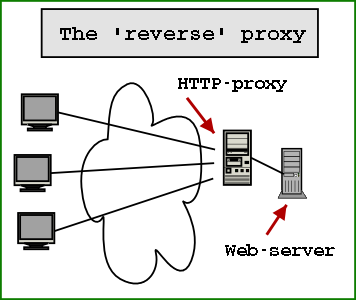
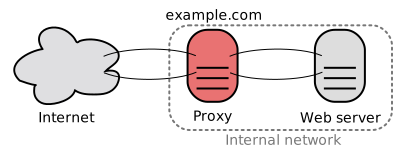
HTTP Caching Reverse Proxy is used for caching HTTP content. It is a proxy that stays between your servers and end uses. All the inbound traffic will hit your proxy and after that your web servers. This proxy will try to cache all the content (dynamical one) and will response to the client with the cached information (when is possible). What kind of content is cached can be directly controlled from images, to CSS or dynamic content.
The reverse cache proxy is faster than our web servers, because all the assets can be served more rapidly. The content of the reverse cache proxy is not complicated and is not so mixed like our web servers. Because reserve cache proxies take a part of the calls that should hit our web servers, the web servers will respond faster. Web server will be able to server request that are more specific and will not spend precious resources delivering content.
Let’s see why a reverse cache proxy is good:
  • Any kind of content can be cached, from static one to dynamically one
  • We can control the cache flush
  • Our web servers will not be so loaded, reverse cache proxy will unload our servers
  • The application don’t need to know about this caching mechanism and switching between with or without reverse caching mechanism can be without caching application
Let’s see what the properties of CDNs are
  • Can be used out-of-the-box, it is implemented by another provider and we only need to use it
  • Not connected with our application
  • It is great for static content, that don’t change very often
  • URLs need to be change a little to be able to use CDN
  • A lot of servers located in different locations
  • It is not connected with our application
  • Recent CDNs can cache dynamic content also
And not the big question… When we should use CDN and when we should use reverse cache proxy?
Caching static content based on geographically location of the users (we eliminate the delay caused generated by user-location) is suitable for CDNs
If we want to reduce the trips to our web-serves, calls to our database and cache frequently content (dynamic, not only static) that reverse cache proxy can be our solution
In conclusion we saw when a CDN or a reverse cache proxy is good. We could say that CDN don’t eliminate the need of a reverse cache proxy. And a reverser cache proxy doesn’t eliminate the need of CDN. We can use both type of caching.
Read More
Posted in Azure, cache, Windows Azure | No comments

Monday, 19 November 2012

Windows Azure Tables - One of the request inputs is not valid.

Posted on 05:00 by Unknown
In this blog post we will talk about an error that occurs when we want to delete or update entities from Windows Azure Tables. Let’s assume that we have the following code:
TableServiceContext serviceContext;
…
serviceContext.AttachTo(“MyFooTable”,entity);
serviceContext.DeleteObject(entity);
serviceContext.SaveChanges();
When we run the code we will see the following error message:
One of the request inputs is not valid.
The source of the problem is the ETag. ETag is used to track changes of an entity and commands like delete use this ETag to check if the entity that is deleted is the last version of entity. If we are share that we want to delete this entity we can set the 3th parameter of AttachTo to “*”. Using “*”, you will specify to the context to not track the entity based on the ETag.
Our code should look something like this:
TableServiceContext serviceContext;
…
serviceContext.AttachTo(“MyFooTable”,entity, “*”);
serviceContext.DeleteObject(entity);
serviceContext.SaveChanges();
Read More
Posted in Azure, Windows Azure | No comments

Sunday, 18 November 2012

Mobile Service on Windows Azure (part1)

Posted on 09:13 by Unknown
This week I started a series of presentation for MSP from Cluj-Napoca about Mobile Services. This is the first presentation, where we saw what are the featured of Windows Azure.
Bellow you can find the slides of this presentation:

Mobile services on windows azure (part1) from Radu Vunvulea
Read More
Posted in | No comments

Thursday, 15 November 2012

Why and Where for MongoDB, Cassandra, CouchDB, HBase, Membase, Redis

Posted on 07:27 by Unknown
More and more people are starting to use NoSQL. I think this is extremely good. NoSQL can make our life better in a lot of situations. In this post I will try make a list of current NoSQL solutions that exist on the market and when we should use each other.

MongoDB
Why
  • Dynamic query
  • Content is stored as documents
  • Big database that need to be very fast
Where
  • Properties are stored like query and index
  • Can be used for voting system, CMS or comment storage

Cassandra
Why
  • When you make a lot of updates and insert
  • Reading data is not the main scope of the database (writes are faster than reads)
  • Content is stored as column
  • High availability
Where
  • Can be used with success for logging
  • Financial industry or any place where we work with a lot of data that is needed to be written
  • Basket of an e-commerce application


CouchDB
Why
  • For data that don’t change very often (insert and read and NOT update)
  • We have a lot of predefined queries and we need versioning support
Where
  • Is a great database for CMS and CRM.

HBase
Why
  • When you do data analyzing
Where
  • Works great in combination with Hadoop

Membase
Why
  • When we need high concurrency
  • When the latency is very low and we want the latency to be minimal
Where
  • Backend of a game or a system that offer data in real time

Redis
Why
  • When we need to make a lot of updates
  • When the database is not too big and can be kept in memory
Where
  • Can be used when we have a real time communication, for example a stock market with prices
If you know other NoSQL solutions or other strong points for this frameworks, please tell me.
    Read More
    Posted in nosql | No comments

    Wednesday, 14 November 2012

    Service Bus Topic - Automatic forward messages from a subscription to a topic

    Posted on 08:06 by Unknown
    Windows Azure Service Bus Topic is a service that enables us to distribute the same messages to different consumers without having to know each consumer. The only think that we need to do is to know the topic name. Each consumer will need to create and connect to a different subscription. Each message added to topic will be forward to each subscription.
    There are times when we need to forward a message from a subscription to another topic or queue. Until now we had to use a worker role that took the message from the subscription and adding it to the second topic.
    From now, a subscription supports this great functionality, by default. We only need to set the name of the topic or queue of the Service Bus where we want to forward the message.
    SubscriptionDescription description = new SubscriptionDescription("topic1","subscription1");
    description.ForwardTo = "topic2";
    SqlFilter filter = new SqlFilter("FW = true");
    namespaceManager.CreateSubscription(description, filter);
    In this setup, all the messages that have the property FW set to true will be send automatically from subscription1 to topic2.
    MessagingFactory messageFactory =
    MessagingFactory.CreateFromConnectionString(connectionString);
    MessageSender messageSender = messageFactory.CreateMessageSender("topic1");
    BrokeredMessage message = new BrokeredMessage();
    messageToSend.Properties.Add("FW", true);
    messageSender.Send(message);
    Don’t forget that the message is not automatically forward to the next topic. Because of this, if you write a unit test you will need to wait 5-10 seconds before checking the second subscription.
    SubscriptionClient messageReceiver =
    messageFactory.CreateSubscriptionClient("topic2", "subscription1");
    BrokeredMessage message = messageReceiver.Receive(new TimeSpan(0, 0, 5));
    We saw how easy is to forward a message from one subscription to another topic. We don’t need a consumer for a subscription or something similar. This is a great feature that permit us to define workflows using Service Bus Topic.
    Read More
    Posted in Azure, service bus, Windows Azure | No comments

    Tuesday, 13 November 2012

    WOWZAPP2012 - Awesome Hackathon

    Posted on 07:50 by Unknown
     This weekend, all around the word we had WOWZAPP Hackathon.  This Windows 8 Hackathon was a 48 marathon of Windows 8 App development. Over 15.000 people were connected with Visual Studio 2012 and develop great application for the new operating system – Windows 8.
    I participate at this event with other 3 colleges and we develop an application that could help you to find location when you don’t have internet connection. We didn’t manage to finish it, we tried to apply MVVM pattern 100%. Our main focus was the code quality and not to finish in 48h. The team name was DOTNET Vampires and team member were: Costin Morariu, Iulia Gorcea, Alexandra Vunvulea and @me.
    This was a great event and we had a lot of fun. In Bucharest, we had almost 40 team. At this event I was not only as a percipient, I was part of the Windows 8 SWAT team. We were the persons that offered technical support for all teams. I think that almost all project had at least 3 lines of code written by me. It was a lot of fun switching between C#/XAML to JavaScript/HTML5 in 5 seconds. We tried to help all the teams from Hackathon.
    In the second day of this event I had a session about Windows 8 developing process and what were the problems during developing of Trip Journal for Windows 8. It was a lot of fun because the session started around 10PM, and a lot of guys were already without one sleepless night.
    In the last day of the event I was part of the jury who chose the winning application. I saw a lot of great applications and it was a really hard thing to do. I was very happy to see that one of my job colleges was on podium and won a Windows 8 tablet.
    Good job Timotei Dolean! You made a great application for Romanian roads. I can’t wait to see it in the store. The current version of the application is in top 6 applications in Windows Phone Marketplace.
    In conclusion we had a lot of fun and we tried to share our knowledge with everyone. See you next year!
    Read More
    Posted in eveniment, hackathon, windows 8 | No comments

    Monday, 12 November 2012

    Windows 8 Dev Camp in Sibiu - 24 nov 2012

    Posted on 14:27 by Unknown
    After the Windows 8 Dev Camp from Cluj-Napoca, we are preparing Windows 8 Dev Camp in Sibiu. To be able to register please follow this link: http://codecamp-sibiu-nov2012.eventbrite.com/ 
    Here is the announcement message for Romanian guys:
    ÃŽn urmă cu aproape o luna, Microsoft a lansat un nou sistem de operare - Windows 8. Cu această ocazie Codecamp împreună cu ITSpark vă invită la “Windows 8 Dev Camp”. ÃŽn cadrul acestui eveniment o să disecăm o parte din secretele pe care un dezvoltator trebuie să le cunoască despre Windows 8.
    Participarea la eveniment este gratuită. Mulțumim în special iQuest pentru susținere.
    Agendă
    9:15-09:30
    Sosirea participanților
    09:30-10:20
    What's new in Windows 8?
    Tudor Damian
    A brief overview of the new features and performance improvements in Windows 8.
    10:30-11:20
    Developing modern web applications: HTML 5, MVVM, Web Sockets
    Mihai Tătăran
    In this session you will see a modern approach to web applications, from designing the client-side JavaScript code, to communication strategies with the server backend. We will touch technologies and frameworks like: HTML 5, knockoutjs, Web Sockets, jQuery.
    11:30-12:20
    Building and testing Windows 8 Metro Style Applications using C++,C# and JavaScript
    Radu Vunvulea
    In this session you will discover how you can develop applications that use components written in different programming language (C++, C# and JavaScript). A brief introduction in WinRT Components and testing tools will also be presented.
    12:20-13:00
    Pauza de masa
    13:00-13:50
    Is encoding, protecting and streaming video a complex issue? Certainly not with Media Services – a novel Windows Azure service
    Mihai Nadăș
    Media Services offer the flexibility, scalability and reliability of a cloud platform to handle high quality media experiences for a global audience. This 50 minutes session will go through the best parts leaving you with the essentials that you need to know before starting a serious media services project. Consuming video content is easy – there’s no reason why developers should not feel the same about doing the plumbing behind the experience.
    14:00-14:50
    Designing Windows 8 Apps with Blend and PowerPoint Storyboards
    Lorant Domokos
    Windows 8 is a new Windows experience. Through the bold use of color, typography, and motion, Microsoft design style brings a fresh new approach to the user experience. In this talk, you'll learn about the Microsoft design principles and how to apply these principles to build your own apps using PowerPoint Storyboards and Blend.
    Sponsori:
    iQuest Group

    To be able to register please follow this link: http://codecamp-sibiu-nov2012.eventbrite.com/

    Read More
    Posted in codecamp, eveniment, windows 8 | No comments

    Saturday, 10 November 2012

    Caliburn.Micro + Windows 8 App - How to send parameter between ViewModel's

    Posted on 22:47 by Unknown
    What do you think about the development process in a C#/XAML app for Windows 8. When we are starting developing an application for this platform we should never forget about MVVM. A great framework for this is Caliburn.Micro. It is a pretty simple and clean framework, with a lot of extensions points.
    When we will try to navigate between screens we will use INavigationService.NavigateToViewModel<TDestionViewModel>. This will work great.
    Navigation.NavigateToViewModel<MyFooPageViewModel>();
    Each ViewModel need to implement the Screen class. This will give access to all the features that we need in the view mode. But what about sending data from one view to another. The method NavigateToViewModel can accept an parameter of type object.
    Navigation.NavigateToViewModel<MyFooPageViewModel>(“some data”);
    Looks good but you will be surprised when you will try to get this data in your destination ViewModel. You will not be able to find this data anywhere.
    To be able to access this parameter, you’ll need to define a parameter in your destination ViewModel named Parameter, with the same time as your parameter that you specify when you call the navigation method.
    public class MyFooViewModel : Screen
    {

    public string Parameter {
    get {...}
    set {...}
    ...
    }
    Don't forget that the Parameter property is set after the ViewModel is created. Because of this, in the setter you should process the input data.
    Enjoy!
    Read More
    Posted in MVVM, windows 8 | No comments

    Thursday, 8 November 2012

    How to fix "Could not load file or assembly 'msshrtmi.dll' ... when you are using .NET 4.5 and Windows Azure 1.8 SDK

    Posted on 11:58 by Unknown
    vIf you started to work with Windows Azure SDK 1.8 on a .NET 4.5 projects, maybe you received the following error message:
    The type initializer for 'Microsoft.WindowsAzure.ServiceRuntime.RoleEnvironment' threw an exception.
    …
    {"Could not load file or assembly 'msshrtmi.dll' or one of its dependencies. A dynamic link library (DLL) initialization routine failed. (Exception from HRESULT: 0x8007045A)":"msshrtmi.dll"}
    This problem usually appears in a console or desktop application when you are trying to use storage service from Windows Azure (blobs, tables or queues).
    The solution is pretty simple, but can give you a lot of headaches until you find what the problem is. The code is okay; you didn’t make any kind of mistake. You only need to change some configurations from app.config.
    You will need to add “useLegacyV2RuntimeActivationPolicy” attribute to the startup node and set it to true. This flat notifies the .NET framework that you have dependencies to older API and make them run in the older runtime.
    Next step is to disable “NetFx40_LegacySecurityPolicy”. In this way you notify the runtime not to use legacy CAS (Code Access Security) policy.
    You’re configuration file should look something like this:
      <startup useLegacyV2RuntimeActivationPolicy="true">
    <supportedRuntime version="v4.0" sku=".NETFramework,Version=v4.5" />
    </startup>

    <runtime>
    <NetFx40_LegacySecurityPolicy enabled="false" />
    </runtime>
    These are the steps that need to be done to get rid of this execution.
    Read More
    Posted in .NET, Azure, error, Windows Azure | No comments

    Wednesday, 7 November 2012

    Today Software Magazine number 6 - Message Patterns using Windows Azure Service Bus

    Posted on 08:57 by Unknown
    This week, Today Software Magazine lunched a new number of their magazine. Great article about software development can be found in this paper. Great articles about SEO, to clean code and cloud can be found in this number.
    I wrote an article about message patterns and Windows Azure Service Bus Topic. In this article I presented two cases when message patterns in combination with Windows Azure Service Bus Topic can make our life easier and to be more prepared for change.
    The current number can be downloading from the following link: http://www.todaysoftmag.com/pdf/TSM_6_2012_ro.pdf 
    At the lunch event I made a short presentation of my article. I added to this blog post my slides:

    Message pattern in windows azure service bus from Radu Vunvulea
    Read More
    Posted in Azure, service bus, Windows Azure | No comments

    How to start Windows Azure emulator when running unit tests

    Posted on 00:02 by Unknown
    Unit test need to be written even if we are working with on-premise services or with services from cloud. When working with Windows Azure, there are times when we want to write some integration test for Windows Azure tables, blobs or queues.
    For these cases we don’t want to hit the Windows Azure from the cloud. This would increase or monthly subscription costs. Usually for this this Windows Storage emulator is used in combination with development storage account.
    When we are on a development machine, where we already have Windows Azure Emulator stared we will not have any kind of problems. But will happen on a machine where Windows Azure Emulator is not started. All the tests will fail.
    We can write a code in the class initialize step that star the emulator. In the end, the emulator is only a process that can be started from the command line.
    The code that we would need to use will look something like this:
    public class CloudStorageEmulatorShepherd
    {
    public void Start()
    {
    try
    {
    CloudStorageAccount storageAccount = CloudStorageAccount.DevelopmentStorageAccount;

    CloudBlobClient blobClient = storageAccount.CreateCloudBlobClient();
    CloudBlobContainer container = blobClient.GetContainerReference("test");
    container.CreateIfNotExist(
    new BlobRequestOptions()
    {
    RetryPolicy = RetryPolicies.NoRetry(),
    Timeout = new TimeSpan(0, 0, 0, 1)
    });
    }
    catch (TimeoutException)
    {
    ProcessStartInfo processStartInfo = new ProcessStartInfo()
    {
    FileName = Path.Combine(
    @"C:\Program Files\Microsoft SDKs\Windows Azure\Emulator",
    "
    csrun.exe"),
    Arguments =
    @"/devstore",
    };

    using (Process process = Process.Start(processStartInfo))
    {
    process.WaitForExit();
    }
    }
    }
    }
    The path to the emulator can be different, based on Windows Azure version. This path can be extracted in the configuration file.  We are testing if the emulator is started by trying to creating a container.  It is very important to set the  NoRetry policty.
    And in our unit test we would need something like this:
    [ClassInitialize()]
    public static void ClassInit(TestContext context)
    {
    CloudStorageEmulatorShepherd shepherd= new CloudStorageEmulatorShepherd();
    shepherd.Start();
    }
    In this way, we will be able to run integration test with Windows Azure without any kind of problem.
    Read More
    Posted in Azure, unit test, Windows Azure | No comments

    Sunday, 4 November 2012

    How to view Skype messages older than 3 months

    Posted on 08:17 by Unknown
    This blog post will not be about programing. In this morning, while I was playing with my Windows Phone 7 I run our off battery. Of course the phone closed. The only problem was the PIN, I don’t remember my SIM pin (this is the first time in 7 months when I closed the phone).
    I knew that I have the SIM pin in my Skype history, but the message is older than 3 months, because of this I could not access the history from that period of time. The good part with Skype is even if is not displaying all the history, he still persist the older messages.
    All the messages can be found in the “%appdata%\skype” in the directory with your Skype user. The easiest way to go at this location is to open a command line and write “%appdata%\skype”. The file that stores all this content is main.db.
    Don’t worry about how you can open this file of is encrypted. It is a simple SQLite file. Is not encrypted and can be pen very easily. A good tool for this purpose is Skype Log View. He will automatically open the file for you.
    In conclusion, if you need messages older than 3 months from Skype, don’t wary. The message still exists on your PC. In my case, I rediscover the pin of my SIM.
    Read More
    Posted in skype | No comments

    Friday, 2 November 2012

    Free online event about Windows Azure - November 14, 2012

    Posted on 00:37 by Unknown


    If you work with Windows Azure and you want to learn more about this great cloud ecosystem or you want to know what can be done on Windows Azure and what are the main features than…
    Microsoft will host Windows AzureConf, a free online event that is done for Windows Azure community. You will be able to see a lot of sessions about Windows Azure. This will be streamed live using Channel 9.
    When:  November 14, 2012
    When: all over the world - live stream
    If you want to register or read more about this event follow this link.
    Read More
    Posted in Azure, Windows Azure | No comments

    Thursday, 1 November 2012

    Duplicate Detection in Windows Azure Service Bus

    Posted on 03:37 by Unknown
    One great feature of Windows Azure Service Bus is the ability to identify the messages that are duplicate. Using this feature we can automatically remove messages from Service Bus Queue or Topic when we have more than one the same message. By default this mechanism is deactivated, but we can activate it very easily.
    Let’s see how this mechanism works. When we activate this mechanism Windows Azure Service Bus will start to store a history with our messages. This period of time can be configures from only a few minutes to days. If a duplicate message is send to Service Bus, the service will automatically ignore the message.
    Because the content of each message need to be serializable, the duplicate detection mechanism will look to the serialized items that were added to the message. If the content is the same, than the message will be consider as duplicate. For example we have the following class that we add to each message:
    [DataContract]
    public Foo
    {
    [DataMember]
    public string Id { get; set;}
    [DataMember]
    public string Name { get; set;}
    }
    If we will add two messages with objects of type Foo with the same id and name, than the second message will be consider duplicate. We will not receive any kind of notification when we will try to send the second message.
    MessagingFactory factory = MessagingFactory.Create([uri], [tokenProvider]);
    MessageSender sender = factory.CreateMessageSender("FooQueue")

    Foo obj1 = new Foo() { Id = “1”, Name = “One” };
    BrokeredMessage message1 = new BrokeredMessage(obj1);

    Foo obj2 = new Foo() { Id = “1”, Name = “One” };
    BrokeredMessage message2 = new BrokeredMessage(obj2);

    sender.Send(message1);
    sender.Send(message2);
    It is very important to remember that the duplicate detection mechanism will use the space from our Service Bus to persist the old messages. Because of this it is very important to be careful when we set the history time period.
    This configuration can be made from two places. One is from portal, when we can activate this feature and set the history time period. This feature will be available only if you select “Custom create”.

    The second place from where this can be configuration can done is from code. In the moment when we create a new Service Bus Topic or Service Bus Queue we can specify in the create command. To be able to do this we will need to create a TopicDescription or a QueueDescription object. In this object we can activate this functionality and set the history time period.
    Topic:
    TopicDescription fooTopicDescription = new TopicDescription("FooTopic")
    {
    RequiresDuplicateDetection = true,
    DuplicateDetectionHistoryTimeWindow = new TimeSpan(10, 0, 0),
    };
    namespaceManager.CreateTopic(fooTopicDescription);
    Queue:
    QueueDescription fooQueueDescription = new QueueDescription("FooQueue")
    {
    RequiresDuplicateDetection = true,
    DuplicateDetectionHistoryTimeWindow = new TimeSpan(10, 0, 0),
    };

    namespaceManager.CreateQueue(fooQueueDescription);
    These policy settings of Service Bus Queue or Service Bus Topic can be changed only on creating time. After this, if we want to change the history time period or to deactivate it, it will not be possible. To be able to do this, you will need to delete the resource and recreate it.
    This is a great feature that can be used when we need to avoid duplicate messages to be added to our Service Bus.
    Read More
    Posted in Azure, service bus, Windows Azure | No comments
    Newer Posts Older Posts Home
    Subscribe to: Comments (Atom)

    Popular Posts

    • Service Bus Topic - Automatic forward messages from a subscription to a topic
      Windows Azure Service Bus Topic is a service that enables us to distribute the same messages to different consumers without having to know e...
    • CDN is not the only solution to improve the page speed - Reverse Caching Proxy
      I heard more and more often think like this: “If your website is to slow, you should use a CDN.” Great, CDN is THE solution for any kind of ...
    • Patterns in Windows Azure Service Bus - Message Splitter Pattern
      In one of my post about Service Bus Topics from Windows Azure I told you that I will write about a post that describe how we can design an a...
    • E-Learning Vendors Attempt to Morph Mobile
      The sign should read: " Don't touch! Wet Paint !" I had a good chuckle today after receiving my latest emailed copy of the eLe...
    • Content Types - Level 6: Rich Media
      Level 6: Rich Media NOTE: This is part 7 of 7 and the conclusion of this continuing series; please see earlier posts for more background inf...
    • Publishing our CellCast Widget for iPad
      The rush has been on this week as our development team worked to design a new version of our CellCast Widget specifically for Apple's up...
    • Content Types - Level 5: Courseware
      Level 5: Content and Courseware NOTE: This is part 6 of 7 in a continuing series; please see earlier posts for more background information. ...
    • SQL - UNION and UNION ALL
      I think that all of us used until now UNION in a SQLstatement. Using this operator we can combine the result of 2 queries. For example we wa...
    • Cum sa salvezi un stream direct intr-un fisier
      Cred ca este a 2-a oara când întâlnesc aceasta cerința in decurs de câteva săptămâni. Se da un stream și o locație unde trebuie salvat, se c...
    • Task.Yield(...), Task.Delay(...)
      I think that a lot of person already heard about these new methods. In this post I want to clarify some things about these new methods that ...

    Categories

    • .NET
    • .NET nice to have
    • #if DEBUG
    • 15 iunie 2011
    • 15 octombrie 2011
    • 2011
    • abstracta
    • action
    • adaugare
    • ajax
    • Amsterdam
    • Android
    • aplicatii
    • App Fabric
    • Apple iSlate
    • array
    • as
    • ASP.NET
    • AsReadOnly
    • Assembly comun
    • async
    • Asynchronous programming
    • asyncron
    • Autofac
    • AutoMapper
    • az
    • Azure
    • Azure AppFabric Cache
    • Azure backup solution
    • Azure Storage Explorer
    • azure. cloud
    • backup
    • BCP utility
    • bing maps v7
    • BitArray
    • BlackBerry
    • blob
    • BlobContainerPublicAccessType
    • breakpoint
    • bucuresti
    • C#
    • cache
    • CallerMemberName
    • CellCast
    • Certificate
    • CES
    • change
    • ChannelFactory
    • clasa
    • classinitialize
    • clean code
    • click event
    • close
    • Cloud
    • Cluj
    • cluj-napoca
    • Code contracts
    • code retrat
    • codecamp
    • CollectionAssert
    • Compact Edition
    • compara
    • Comparer T .Default
    • CompareTo
    • comparison
    • comunitate
    • concurs
    • Conditional attribute
    • configurare
    • connection string
    • container
    • content type
    • control
    • Convert
    • convertAll
    • convertor
    • cross platform
    • CRUD
    • css
    • custom properties
    • custom request
    • DACPAC
    • Daniel Andres
    • data sync service
    • database
    • date time
    • datetime
    • debug
    • default
    • delegate
    • dependency injection
    • deploy
    • DeploymentItem
    • design patterns
    • Dev de Amsterdam
    • development stoage
    • dictionary
    • diferente
    • digging
    • director
    • Directory.Exist
    • disable
    • dispatcher
    • dispose
    • dropdown
    • dynamic
    • EF
    • email
    • encoding
    • entity framework
    • enum
    • enumerable
    • Environment.NewLine
    • error
    • error 404
    • error handling
    • eveniment
    • event
    • ews
    • excel
    • exception
    • exchange
    • exita
    • explicit
    • export
    • extension
    • field
    • File.Exist
    • finalize
    • fire and forget
    • Fluent interface pattern
    • format
    • func
    • GC.SuppressFinalize
    • generic
    • getdirectoryname
    • globalization
    • gmail
    • hackathon
    • Hadoop
    • handle
    • HTML
    • html 5
    • Html.ActionLink
    • http://www.blogger.com/img/blank.gif
    • HttpModule
    • IComparable
    • IE
    • ienumerable
    • IIS
    • image
    • implicit
    • import
    • int
    • internationalization
    • Internet Explorer
    • interop
    • Ioc
    • IP Filter
    • iPhone
    • iQuest
    • IStructuralEquatable
    • ITCamp
    • itspark
    • java script
    • javascript
    • July 2012
    • KeyedByTypeCollection
    • KeyNotFoundException
    • Kinect SDK
    • lambda expression
    • LightSwitch Microsoft Silverlight
    • linq
    • list
    • lista
    • lista servicii
    • liste
    • Live Connect
    • Live ID
    • load
    • localization
    • lock
    • m-learning
    • MAC
    • Mango
    • map
    • mapare
    • mapare propietati
    • messagequeue
    • meta properties
    • method
    • MethodImpl
    • Metro App
    • Microsoft
    • Microsoft Sync Framework
    • mlearning
    • mlearning devices
    • Mobile Apps
    • mobile in the cloud
    • mobile learning
    • mobile services
    • Mobile Web
    • mongoDb
    • monitorizare
    • msmq
    • multitasking
    • MVC
    • MVC 3
    • MVVM
    • namespace
    • nextpartitionkey
    • nextrowkey
    • Ninject
    • nivel acces
    • no result
    • normalize
    • nosql
    • null expcetion
    • null object pattern
    • NullReferenceException
    • OAuth API
    • office
    • offline
    • Open ID
    • openhackeu2011
    • operations
    • operator
    • optimization
    • option
    • outputcache
    • OutputCacheProvider
    • override
    • paginare
    • pagination
    • path
    • persistare
    • Portable Library tool
    • Post event – CodeCamp Cluj-Napoca
    • predicate
    • predictions
    • prezentare
    • process
    • proiect
    • property
    • propietati
    • query
    • ReadOnlyCollection
    • ReadOnlyDictionary
    • referinta
    • reflection
    • remote
    • reply command
    • request
    • request response
    • resouce
    • REST
    • REST Client
    • RESTSharp
    • ronua
    • rss
    • rulare
    • salvare in fisier
    • sc
    • schimbare timp
    • select
    • select nodes
    • send
    • serializare
    • serialization
    • Server.Transfer. Resposen.Redirect
    • service bus
    • ServiceBase
    • servicecontroller
    • sesiune
    • session
    • Session_End
    • Session_Start
    • setup
    • Sibiu
    • signalR
    • Silverlight
    • sincronizare
    • Single Responsibility Principle
    • SkyDrive
    • skype
    • smartphones
    • smtp
    • Snapguide
    • sniffer
    • socket
    • solid
    • spec#
    • sql
    • Sql Azure
    • SQL CE
    • sql server 2008 RC
    • SRP
    • startuptype
    • stateful
    • stateless
    • static
    • stergere
    • store
    • store procedure
    • stream
    • string
    • string.join
    • struct
    • StructuralEqualityComparer
    • submit
    • switch
    • Symbian
    • Synchronized
    • system
    • tabele
    • table
    • techEd 2012
    • tempdata
    • test
    • testcleanup
    • testinitialize
    • testmethod
    • thread
    • timer
    • ToLower
    • tool
    • tostring
    • Total Cost Calculator
    • trace ASP.NET
    • transcoding
    • tuplu
    • tutorial
    • TWmLearning
    • type
    • unit test
    • unittest
    • UrlParameter.Optional
    • Validate
    • validation
    • verificare
    • video
    • view
    • ViewBag
    • virtual
    • visual studio
    • VM role
    • Vunvulea Radu
    • wallpaper
    • WCF
    • WebBrower
    • WebRequest
    • where clause
    • Windows
    • windows 8
    • Windows Azure
    • Windows Azure Service Management CmdLets
    • windows live messenger
    • Windows Mobile
    • Windows Phone
    • windows service
    • windows store application
    • Windows Task
    • WinRT
    • word
    • workaround
    • XBox
    • xml
    • xmlns
    • XNA
    • xpath
    • YMesseger
    • Yonder
    • Zip

    Blog Archive

    • ►  2013 (139)
      • ►  November (17)
      • ►  October (12)
      • ►  September (10)
      • ►  August (7)
      • ►  July (8)
      • ►  June (15)
      • ►  May (12)
      • ►  April (17)
      • ►  March (16)
      • ►  February (9)
      • ►  January (16)
    • ▼  2012 (251)
      • ►  December (9)
      • ▼  November (19)
        • Mobile Service on Windows Azure (part 3)
        • Windows 8 Dev Camp Sibiu, 24.11.2012 - Postevent
        • Mobile Services from Windows Azure - Introduction
        • NetCamp 2012 - Windows 8 development experience
        • Mobile Service on Windows Azure (part 2)
        • CDN is not the only solution to improve the page s...
        • Windows Azure Tables - One of the request inputs ...
        • Mobile Service on Windows Azure (part1)
        • Why and Where for MongoDB, Cassandra, CouchDB, HBa...
        • Service Bus Topic - Automatic forward messages fro...
        • WOWZAPP2012 - Awesome Hackathon
        • Windows 8 Dev Camp in Sibiu - 24 nov 2012
        • Caliburn.Micro + Windows 8 App - How to send param...
        • How to fix "Could not load file or assembly 'msshr...
        • Today Software Magazine number 6 - Message Pattern...
        • How to start Windows Azure emulator when running u...
        • How to view Skype messages older than 3 months
        • Free online event about Windows Azure - November 1...
        • Duplicate Detection in Windows Azure Service Bus
      • ►  October (26)
      • ►  September (13)
      • ►  August (35)
      • ►  July (28)
      • ►  June (27)
      • ►  May (24)
      • ►  April (18)
      • ►  March (17)
      • ►  February (20)
      • ►  January (15)
    • ►  2011 (127)
      • ►  December (11)
      • ►  November (20)
      • ►  October (8)
      • ►  September (8)
      • ►  August (8)
      • ►  July (10)
      • ►  June (5)
      • ►  May (8)
      • ►  April (9)
      • ►  March (14)
      • ►  February (20)
      • ►  January (6)
    • ►  2010 (26)
      • ►  December (1)
      • ►  November (1)
      • ►  October (1)
      • ►  June (2)
      • ►  May (1)
      • ►  April (4)
      • ►  March (1)
      • ►  February (1)
      • ►  January (14)
    Powered by Blogger.

    About Me

    Unknown
    View my complete profile