Windows Mobile Support

  • Subscribe to our RSS feed.
  • Twitter
  • StumbleUpon
  • Reddit
  • Facebook
  • Digg

Tuesday, 20 November 2012

CDN is not the only solution to improve the page speed - Reverse Caching Proxy

Posted on 07:34 by Unknown
I heard more and more often think like this: “If your website is to slow, you should use a CDN.” Great, CDN is THE solution for any kind of problems… or not. Depends what is our problem.
First of all let’s see what does CDN means. Content Delivery Network gives us the possibility to improve our web application performance by distributing our content in different geographical location that is closed to our client. This is a great solution when we have static content like images, videos or any kind of static content.
In this moment there are a lot of great solutions, from Azure CDN that are very easy to config and scalable to EdgeCast or Akamai.
But maybe our problem is not from there. What happens if users are in the same geographical region? Using a CDN may or not may improve our speed performance. The entire request will hit our servers. A bunny will tell us: “It’s not a problem dude, we live in the cloud nowadays, scale up your application on more instances”.
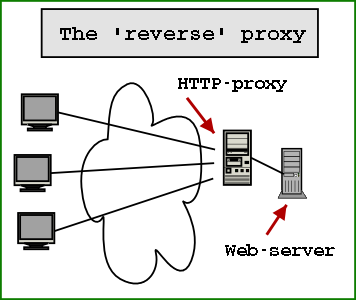
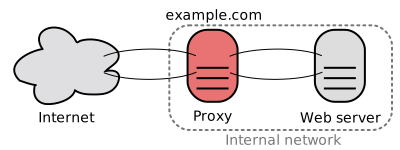
HTTP Caching Reverse Proxy is used for caching HTTP content. It is a proxy that stays between your servers and end uses. All the inbound traffic will hit your proxy and after that your web servers. This proxy will try to cache all the content (dynamical one) and will response to the client with the cached information (when is possible). What kind of content is cached can be directly controlled from images, to CSS or dynamic content.
The reverse cache proxy is faster than our web servers, because all the assets can be served more rapidly. The content of the reverse cache proxy is not complicated and is not so mixed like our web servers. Because reserve cache proxies take a part of the calls that should hit our web servers, the web servers will respond faster. Web server will be able to server request that are more specific and will not spend precious resources delivering content.
Let’s see why a reverse cache proxy is good:
  • Any kind of content can be cached, from static one to dynamically one
  • We can control the cache flush
  • Our web servers will not be so loaded, reverse cache proxy will unload our servers
  • The application don’t need to know about this caching mechanism and switching between with or without reverse caching mechanism can be without caching application
Let’s see what the properties of CDNs are
  • Can be used out-of-the-box, it is implemented by another provider and we only need to use it
  • Not connected with our application
  • It is great for static content, that don’t change very often
  • URLs need to be change a little to be able to use CDN
  • A lot of servers located in different locations
  • It is not connected with our application
  • Recent CDNs can cache dynamic content also
And not the big question… When we should use CDN and when we should use reverse cache proxy?
Caching static content based on geographically location of the users (we eliminate the delay caused generated by user-location) is suitable for CDNs
If we want to reduce the trips to our web-serves, calls to our database and cache frequently content (dynamic, not only static) that reverse cache proxy can be our solution
In conclusion we saw when a CDN or a reverse cache proxy is good. We could say that CDN don’t eliminate the need of a reverse cache proxy. And a reverser cache proxy doesn’t eliminate the need of CDN. We can use both type of caching.
Read More
Posted in Azure, cache, Windows Azure | No comments

Monday, 19 November 2012

Windows Azure Tables - One of the request inputs is not valid.

Posted on 05:00 by Unknown
In this blog post we will talk about an error that occurs when we want to delete or update entities from Windows Azure Tables. Let’s assume that we have the following code:
TableServiceContext serviceContext;
…
serviceContext.AttachTo(“MyFooTable”,entity);
serviceContext.DeleteObject(entity);
serviceContext.SaveChanges();
When we run the code we will see the following error message:
One of the request inputs is not valid.
The source of the problem is the ETag. ETag is used to track changes of an entity and commands like delete use this ETag to check if the entity that is deleted is the last version of entity. If we are share that we want to delete this entity we can set the 3th parameter of AttachTo to “*”. Using “*”, you will specify to the context to not track the entity based on the ETag.
Our code should look something like this:
TableServiceContext serviceContext;
…
serviceContext.AttachTo(“MyFooTable”,entity, “*”);
serviceContext.DeleteObject(entity);
serviceContext.SaveChanges();
Read More
Posted in Azure, Windows Azure | No comments

Sunday, 18 November 2012

Mobile Service on Windows Azure (part1)

Posted on 09:13 by Unknown
This week I started a series of presentation for MSP from Cluj-Napoca about Mobile Services. This is the first presentation, where we saw what are the featured of Windows Azure.
Bellow you can find the slides of this presentation:

Mobile services on windows azure (part1) from Radu Vunvulea
Read More
Posted in | No comments

Thursday, 15 November 2012

Why and Where for MongoDB, Cassandra, CouchDB, HBase, Membase, Redis

Posted on 07:27 by Unknown
More and more people are starting to use NoSQL. I think this is extremely good. NoSQL can make our life better in a lot of situations. In this post I will try make a list of current NoSQL solutions that exist on the market and when we should use each other.

MongoDB
Why
  • Dynamic query
  • Content is stored as documents
  • Big database that need to be very fast
Where
  • Properties are stored like query and index
  • Can be used for voting system, CMS or comment storage

Cassandra
Why
  • When you make a lot of updates and insert
  • Reading data is not the main scope of the database (writes are faster than reads)
  • Content is stored as column
  • High availability
Where
  • Can be used with success for logging
  • Financial industry or any place where we work with a lot of data that is needed to be written
  • Basket of an e-commerce application


CouchDB
Why
  • For data that don’t change very often (insert and read and NOT update)
  • We have a lot of predefined queries and we need versioning support
Where
  • Is a great database for CMS and CRM.

HBase
Why
  • When you do data analyzing
Where
  • Works great in combination with Hadoop

Membase
Why
  • When we need high concurrency
  • When the latency is very low and we want the latency to be minimal
Where
  • Backend of a game or a system that offer data in real time

Redis
Why
  • When we need to make a lot of updates
  • When the database is not too big and can be kept in memory
Where
  • Can be used when we have a real time communication, for example a stock market with prices
If you know other NoSQL solutions or other strong points for this frameworks, please tell me.
    Read More
    Posted in nosql | No comments

    Wednesday, 14 November 2012

    Service Bus Topic - Automatic forward messages from a subscription to a topic

    Posted on 08:06 by Unknown
    Windows Azure Service Bus Topic is a service that enables us to distribute the same messages to different consumers without having to know each consumer. The only think that we need to do is to know the topic name. Each consumer will need to create and connect to a different subscription. Each message added to topic will be forward to each subscription.
    There are times when we need to forward a message from a subscription to another topic or queue. Until now we had to use a worker role that took the message from the subscription and adding it to the second topic.
    From now, a subscription supports this great functionality, by default. We only need to set the name of the topic or queue of the Service Bus where we want to forward the message.
    SubscriptionDescription description = new SubscriptionDescription("topic1","subscription1");
    description.ForwardTo = "topic2";
    SqlFilter filter = new SqlFilter("FW = true");
    namespaceManager.CreateSubscription(description, filter);
    In this setup, all the messages that have the property FW set to true will be send automatically from subscription1 to topic2.
    MessagingFactory messageFactory =
    MessagingFactory.CreateFromConnectionString(connectionString);
    MessageSender messageSender = messageFactory.CreateMessageSender("topic1");
    BrokeredMessage message = new BrokeredMessage();
    messageToSend.Properties.Add("FW", true);
    messageSender.Send(message);
    Don’t forget that the message is not automatically forward to the next topic. Because of this, if you write a unit test you will need to wait 5-10 seconds before checking the second subscription.
    SubscriptionClient messageReceiver =
    messageFactory.CreateSubscriptionClient("topic2", "subscription1");
    BrokeredMessage message = messageReceiver.Receive(new TimeSpan(0, 0, 5));
    We saw how easy is to forward a message from one subscription to another topic. We don’t need a consumer for a subscription or something similar. This is a great feature that permit us to define workflows using Service Bus Topic.
    Read More
    Posted in Azure, service bus, Windows Azure | No comments

    Tuesday, 13 November 2012

    WOWZAPP2012 - Awesome Hackathon

    Posted on 07:50 by Unknown
     This weekend, all around the word we had WOWZAPP Hackathon.  This Windows 8 Hackathon was a 48 marathon of Windows 8 App development. Over 15.000 people were connected with Visual Studio 2012 and develop great application for the new operating system – Windows 8.
    I participate at this event with other 3 colleges and we develop an application that could help you to find location when you don’t have internet connection. We didn’t manage to finish it, we tried to apply MVVM pattern 100%. Our main focus was the code quality and not to finish in 48h. The team name was DOTNET Vampires and team member were: Costin Morariu, Iulia Gorcea, Alexandra Vunvulea and @me.
    This was a great event and we had a lot of fun. In Bucharest, we had almost 40 team. At this event I was not only as a percipient, I was part of the Windows 8 SWAT team. We were the persons that offered technical support for all teams. I think that almost all project had at least 3 lines of code written by me. It was a lot of fun switching between C#/XAML to JavaScript/HTML5 in 5 seconds. We tried to help all the teams from Hackathon.
    In the second day of this event I had a session about Windows 8 developing process and what were the problems during developing of Trip Journal for Windows 8. It was a lot of fun because the session started around 10PM, and a lot of guys were already without one sleepless night.
    In the last day of the event I was part of the jury who chose the winning application. I saw a lot of great applications and it was a really hard thing to do. I was very happy to see that one of my job colleges was on podium and won a Windows 8 tablet.
    Good job Timotei Dolean! You made a great application for Romanian roads. I can’t wait to see it in the store. The current version of the application is in top 6 applications in Windows Phone Marketplace.
    In conclusion we had a lot of fun and we tried to share our knowledge with everyone. See you next year!
    Read More
    Posted in eveniment, hackathon, windows 8 | No comments

    Monday, 12 November 2012

    Windows 8 Dev Camp in Sibiu - 24 nov 2012

    Posted on 14:27 by Unknown
    After the Windows 8 Dev Camp from Cluj-Napoca, we are preparing Windows 8 Dev Camp in Sibiu. To be able to register please follow this link: http://codecamp-sibiu-nov2012.eventbrite.com/ 
    Here is the announcement message for Romanian guys:
    În urmă cu aproape o luna, Microsoft a lansat un nou sistem de operare - Windows 8. Cu această ocazie Codecamp împreună cu ITSpark vă invită la “Windows 8 Dev Camp”. În cadrul acestui eveniment o să disecăm o parte din secretele pe care un dezvoltator trebuie să le cunoască despre Windows 8.
    Participarea la eveniment este gratuită. Mulțumim în special iQuest pentru susținere.
    Agendă
    9:15-09:30
    Sosirea participanților
    09:30-10:20
    What's new in Windows 8?
    Tudor Damian
    A brief overview of the new features and performance improvements in Windows 8.
    10:30-11:20
    Developing modern web applications: HTML 5, MVVM, Web Sockets
    Mihai Tătăran
    In this session you will see a modern approach to web applications, from designing the client-side JavaScript code, to communication strategies with the server backend. We will touch technologies and frameworks like: HTML 5, knockoutjs, Web Sockets, jQuery.
    11:30-12:20
    Building and testing Windows 8 Metro Style Applications using C++,C# and JavaScript
    Radu Vunvulea
    In this session you will discover how you can develop applications that use components written in different programming language (C++, C# and JavaScript). A brief introduction in WinRT Components and testing tools will also be presented.
    12:20-13:00
    Pauza de masa
    13:00-13:50
    Is encoding, protecting and streaming video a complex issue? Certainly not with Media Services – a novel Windows Azure service
    Mihai Nadăș
    Media Services offer the flexibility, scalability and reliability of a cloud platform to handle high quality media experiences for a global audience. This 50 minutes session will go through the best parts leaving you with the essentials that you need to know before starting a serious media services project. Consuming video content is easy – there’s no reason why developers should not feel the same about doing the plumbing behind the experience.
    14:00-14:50
    Designing Windows 8 Apps with Blend and PowerPoint Storyboards
    Lorant Domokos
    Windows 8 is a new Windows experience. Through the bold use of color, typography, and motion, Microsoft design style brings a fresh new approach to the user experience. In this talk, you'll learn about the Microsoft design principles and how to apply these principles to build your own apps using PowerPoint Storyboards and Blend.
    Sponsori:
    iQuest Group

    To be able to register please follow this link: http://codecamp-sibiu-nov2012.eventbrite.com/

    Read More
    Posted in codecamp, eveniment, windows 8 | No comments
    Newer Posts Older Posts Home
    Subscribe to: Posts (Atom)

    Popular Posts

    • E-Learning Vendors Attempt to Morph Mobile
      The sign should read: " Don't touch! Wet Paint !" I had a good chuckle today after receiving my latest emailed copy of the eLe...
    • Content Types - Level 6: Rich Media
      Level 6: Rich Media NOTE: This is part 7 of 7 and the conclusion of this continuing series; please see earlier posts for more background inf...
    • CDN is not the only solution to improve the page speed - Reverse Caching Proxy
      I heard more and more often think like this: “If your website is to slow, you should use a CDN.” Great, CDN is THE solution for any kind of ...
    • Publishing our CellCast Widget for iPad
      The rush has been on this week as our development team worked to design a new version of our CellCast Widget specifically for Apple's up...
    • NetCamp 2012 - Windows 8 development experience
      During this week I participate to NetCamp 2012.  This was the 6th NetCamp event and is organizing by Evensys. NetCamp is a dedicated event f...
    • SQL - UNION and UNION ALL
      I think that all of us used until now UNION in a SQLstatement. Using this operator we can combine the result of 2 queries. For example we wa...
    • Password/Token/PIN definition
      Password, Token, PIN, Passcode… every day we use this items when we need to authenticate in different systems. I observed that there are tim...
    • Shared Access Signature and URL encoding on Windows Azure
      Playing a little with Shared Access Signature was quite nice. In this moment this new functionality has a great potential. Playing a little ...
    • Content Types - Level 4: Reference
      Level 4: Reference Materials & Static Content NOTE: This is part 5 of 7 in a continuing series; please see earlier posts for more backgr...
    • Patterns in Windows Azure Service Bus - Message Splitter Pattern
      In one of my post about Service Bus Topics from Windows Azure I told you that I will write about a post that describe how we can design an a...

    Categories

    • .NET
    • .NET nice to have
    • #if DEBUG
    • 15 iunie 2011
    • 15 octombrie 2011
    • 2011
    • abstracta
    • action
    • adaugare
    • ajax
    • Amsterdam
    • Android
    • aplicatii
    • App Fabric
    • Apple iSlate
    • array
    • as
    • ASP.NET
    • AsReadOnly
    • Assembly comun
    • async
    • Asynchronous programming
    • asyncron
    • Autofac
    • AutoMapper
    • az
    • Azure
    • Azure AppFabric Cache
    • Azure backup solution
    • Azure Storage Explorer
    • azure. cloud
    • backup
    • BCP utility
    • bing maps v7
    • BitArray
    • BlackBerry
    • blob
    • BlobContainerPublicAccessType
    • breakpoint
    • bucuresti
    • C#
    • cache
    • CallerMemberName
    • CellCast
    • Certificate
    • CES
    • change
    • ChannelFactory
    • clasa
    • classinitialize
    • clean code
    • click event
    • close
    • Cloud
    • Cluj
    • cluj-napoca
    • Code contracts
    • code retrat
    • codecamp
    • CollectionAssert
    • Compact Edition
    • compara
    • Comparer T .Default
    • CompareTo
    • comparison
    • comunitate
    • concurs
    • Conditional attribute
    • configurare
    • connection string
    • container
    • content type
    • control
    • Convert
    • convertAll
    • convertor
    • cross platform
    • CRUD
    • css
    • custom properties
    • custom request
    • DACPAC
    • Daniel Andres
    • data sync service
    • database
    • date time
    • datetime
    • debug
    • default
    • delegate
    • dependency injection
    • deploy
    • DeploymentItem
    • design patterns
    • Dev de Amsterdam
    • development stoage
    • dictionary
    • diferente
    • digging
    • director
    • Directory.Exist
    • disable
    • dispatcher
    • dispose
    • dropdown
    • dynamic
    • EF
    • email
    • encoding
    • entity framework
    • enum
    • enumerable
    • Environment.NewLine
    • error
    • error 404
    • error handling
    • eveniment
    • event
    • ews
    • excel
    • exception
    • exchange
    • exita
    • explicit
    • export
    • extension
    • field
    • File.Exist
    • finalize
    • fire and forget
    • Fluent interface pattern
    • format
    • func
    • GC.SuppressFinalize
    • generic
    • getdirectoryname
    • globalization
    • gmail
    • hackathon
    • Hadoop
    • handle
    • HTML
    • html 5
    • Html.ActionLink
    • http://www.blogger.com/img/blank.gif
    • HttpModule
    • IComparable
    • IE
    • ienumerable
    • IIS
    • image
    • implicit
    • import
    • int
    • internationalization
    • Internet Explorer
    • interop
    • Ioc
    • IP Filter
    • iPhone
    • iQuest
    • IStructuralEquatable
    • ITCamp
    • itspark
    • java script
    • javascript
    • July 2012
    • KeyedByTypeCollection
    • KeyNotFoundException
    • Kinect SDK
    • lambda expression
    • LightSwitch Microsoft Silverlight
    • linq
    • list
    • lista
    • lista servicii
    • liste
    • Live Connect
    • Live ID
    • load
    • localization
    • lock
    • m-learning
    • MAC
    • Mango
    • map
    • mapare
    • mapare propietati
    • messagequeue
    • meta properties
    • method
    • MethodImpl
    • Metro App
    • Microsoft
    • Microsoft Sync Framework
    • mlearning
    • mlearning devices
    • Mobile Apps
    • mobile in the cloud
    • mobile learning
    • mobile services
    • Mobile Web
    • mongoDb
    • monitorizare
    • msmq
    • multitasking
    • MVC
    • MVC 3
    • MVVM
    • namespace
    • nextpartitionkey
    • nextrowkey
    • Ninject
    • nivel acces
    • no result
    • normalize
    • nosql
    • null expcetion
    • null object pattern
    • NullReferenceException
    • OAuth API
    • office
    • offline
    • Open ID
    • openhackeu2011
    • operations
    • operator
    • optimization
    • option
    • outputcache
    • OutputCacheProvider
    • override
    • paginare
    • pagination
    • path
    • persistare
    • Portable Library tool
    • Post event – CodeCamp Cluj-Napoca
    • predicate
    • predictions
    • prezentare
    • process
    • proiect
    • property
    • propietati
    • query
    • ReadOnlyCollection
    • ReadOnlyDictionary
    • referinta
    • reflection
    • remote
    • reply command
    • request
    • request response
    • resouce
    • REST
    • REST Client
    • RESTSharp
    • ronua
    • rss
    • rulare
    • salvare in fisier
    • sc
    • schimbare timp
    • select
    • select nodes
    • send
    • serializare
    • serialization
    • Server.Transfer. Resposen.Redirect
    • service bus
    • ServiceBase
    • servicecontroller
    • sesiune
    • session
    • Session_End
    • Session_Start
    • setup
    • Sibiu
    • signalR
    • Silverlight
    • sincronizare
    • Single Responsibility Principle
    • SkyDrive
    • skype
    • smartphones
    • smtp
    • Snapguide
    • sniffer
    • socket
    • solid
    • spec#
    • sql
    • Sql Azure
    • SQL CE
    • sql server 2008 RC
    • SRP
    • startuptype
    • stateful
    • stateless
    • static
    • stergere
    • store
    • store procedure
    • stream
    • string
    • string.join
    • struct
    • StructuralEqualityComparer
    • submit
    • switch
    • Symbian
    • Synchronized
    • system
    • tabele
    • table
    • techEd 2012
    • tempdata
    • test
    • testcleanup
    • testinitialize
    • testmethod
    • thread
    • timer
    • ToLower
    • tool
    • tostring
    • Total Cost Calculator
    • trace ASP.NET
    • transcoding
    • tuplu
    • tutorial
    • TWmLearning
    • type
    • unit test
    • unittest
    • UrlParameter.Optional
    • Validate
    • validation
    • verificare
    • video
    • view
    • ViewBag
    • virtual
    • visual studio
    • VM role
    • Vunvulea Radu
    • wallpaper
    • WCF
    • WebBrower
    • WebRequest
    • where clause
    • Windows
    • windows 8
    • Windows Azure
    • Windows Azure Service Management CmdLets
    • windows live messenger
    • Windows Mobile
    • Windows Phone
    • windows service
    • windows store application
    • Windows Task
    • WinRT
    • word
    • workaround
    • XBox
    • xml
    • xmlns
    • XNA
    • xpath
    • YMesseger
    • Yonder
    • Zip

    Blog Archive

    • ▼  2013 (139)
      • ▼  November (17)
        • Service Bus - Optimize consumers using prefetch an...
        • Extract relative Uri using MakeRelativeUri method
        • Sync Group - Let's talk about Performance
        • [PostEvent] Slides from MSSummit 2013, Bucharest
        • How to get the instance index of a web role or wor...
        • Sync Group - A good solution to synchronize SQL Da...
        • Throttling and Availability over Windows Azure Ser...
        • How to monitor clients that access your blob storage?
        • Digging through SignalR - Dependency Resolver
        • [Event] Global Day of Coderetreat in Cluj-Napoca! ...
        • Windows Azure Service Bus - What ports are used
        • Debugging in production
        • Simple load balancer for SQL Server Database
        • [PostEvent] MSSummit 2013, Bucharest
        • How to read response time when you run a performan...
        • VM and load balancer, direct server return, availa...
        • Bugs that cover each other
      • ►  October (12)
      • ►  September (10)
      • ►  August (7)
      • ►  July (8)
      • ►  June (15)
      • ►  May (12)
      • ►  April (17)
      • ►  March (16)
      • ►  February (9)
      • ►  January (16)
    • ►  2012 (251)
      • ►  December (9)
      • ►  November (19)
      • ►  October (26)
      • ►  September (13)
      • ►  August (35)
      • ►  July (28)
      • ►  June (27)
      • ►  May (24)
      • ►  April (18)
      • ►  March (17)
      • ►  February (20)
      • ►  January (15)
    • ►  2011 (127)
      • ►  December (11)
      • ►  November (20)
      • ►  October (8)
      • ►  September (8)
      • ►  August (8)
      • ►  July (10)
      • ►  June (5)
      • ►  May (8)
      • ►  April (9)
      • ►  March (14)
      • ►  February (20)
      • ►  January (6)
    • ►  2010 (26)
      • ►  December (1)
      • ►  November (1)
      • ►  October (1)
      • ►  June (2)
      • ►  May (1)
      • ►  April (4)
      • ►  March (1)
      • ►  February (1)
      • ►  January (14)
    Powered by Blogger.

    About Me

    Unknown
    View my complete profile